> ## Documentation Index
> Fetch the complete documentation index at: https://docs.cognigy.com/llms.txt
> Use this file to discover all available pages before exploring further.
# AI Agent Memory
In Cognigy.AI, the *AI Agent Memory* refers to the data from the user, user input, or conversation the AI Agent can retrieve. The AI Agent memory is stored in Cognigy.AI objects which you can access using [CognigyScript](/ai/platform-features/cognigyscript) and [Tokens](/ai/platform-features/tokens). You can retrieve the stored information to generate context-aware AI Agent answers and control your Flows better, for example, with [Intent Conditions](/ai/platform-features/nlu/intents/conditions).
Cognigy.AI objects are JSON objects that store different types of information:
* [Input object](/ai/agents/develop/ai-agent-memory/input) — the user input information, such as the [Intents](/ai/platform-features/nlu/intents/overview) in the user's message, the [Channel](/ai/agents/develop/nodes/channels) through which the user interacts with the AI Agent, and other relevant metadata.
* [Context object](/ai/agents/develop/ai-agent-memory/context) — session-specific information, such as selected products or the user's current location.
* [Profile object](/ai/agents/develop/ai-agent-memory/profile) — [Contact Profile](/ai/agents/analyze/contact-profiles) data, such as user names and email addresses.
## How to Access the AI Agent's Memory
The following table shows how to access values from the Input, Context, and Profile objects with CognigyScript:
| | Input | Context | Profile |
| ---------------- | ---------------- | --------------------------- | ----------------------- |
| Variable | `input` | `context` | `profile` |
| Shortcut | `ci` | `cc` | `cp` |
| Example | `{{input.text}}` | `{{context.selectedHotel}}` | `{{profile.firstname}}` |
| Shortcut Example | `{{ci.text}}` | `{{cc.selectedHotel}}` | `{{cp.firstname}}` |
### Lifespan of Cognigy.AI Objects
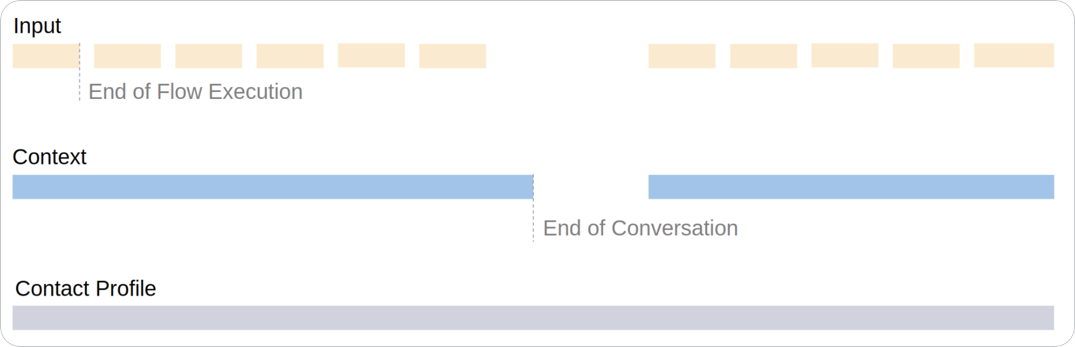
The lifespan of Cognigy.AI objects varies depending on their type:
* **Input** — each new user input and Flow execution generates a new Input object.
* **Context** — kept throughout the entire chat or call session.
* **Profile** — stored persistently to preserve information, such as user name, throughout conversations.
The following image shows a comparison of the lifespans of Cognigy.AI objects: