> ## Documentation Index
> Fetch the complete documentation index at: https://docs.cognigy.com/llms.txt
> Use this file to discover all available pages before exploring further.
# Copilot: Adaptive Card Tile
Updated in 4.79
 ## Description
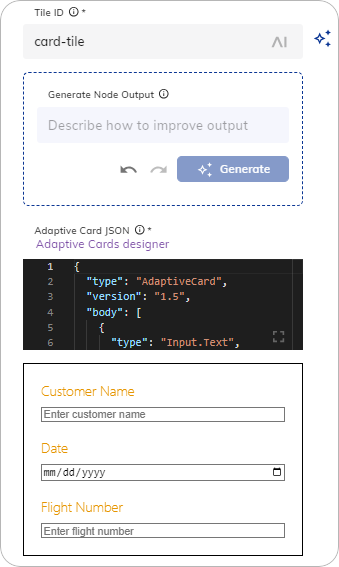
This Node allows you to create and display adaptive cards in your Agent Copilot workspace. Adaptive cards can display rich content and interactive elements, such as images, text, buttons, and forms.
The [Adaptive Card Designer](https://adaptivecards.io/designer) can help you to define an Adaptive Card. Copy the JSON card payload and paste it into the form. Alternatively, you can use Generative AI to create a new adaptive card or improve an existing one.
## Parameters
| Parameter | Type | Description |
| -------------------- | ------------- | -------------------------------------------------------------------------------------------------- |
| Tile ID | CognigyScript | The ID that you created in the Agent Copilot configuration. |
| Generate Node Output | Text | A prompt or instruction for generating the adaptive card. To apply the prompt, click **Generate**. |
| Adaptive Card JSON | JSON | The JSON payload to render inside the tile. Supported schema version: `1.5` or earlier. |
Before creating an Adaptive Card with Generative AI, ensure that you are connected to one of the [LLM Providers](/ai/agents/develop/gen-ai-and-llms/generative-ai#prerequisites).
To use this feature, follow these steps:
1. In the **Generate Node Output** section, instruct the Generative AI model how to improve the current adaptive card. For example, `Create a form with a customer name field and a date input field`.
2. Click **Generate**. The adaptive card will be generated.
3. Iteratively improve the resulting adaptive card by giving further instructions in the **Generate Node Output** section. For example, `Add a flight number field`.
4. Click **Generate**. The existing adaptive card will be updated.
To navigate between your inputs, use
## Description
This Node allows you to create and display adaptive cards in your Agent Copilot workspace. Adaptive cards can display rich content and interactive elements, such as images, text, buttons, and forms.
The [Adaptive Card Designer](https://adaptivecards.io/designer) can help you to define an Adaptive Card. Copy the JSON card payload and paste it into the form. Alternatively, you can use Generative AI to create a new adaptive card or improve an existing one.
## Parameters
| Parameter | Type | Description |
| -------------------- | ------------- | -------------------------------------------------------------------------------------------------- |
| Tile ID | CognigyScript | The ID that you created in the Agent Copilot configuration. |
| Generate Node Output | Text | A prompt or instruction for generating the adaptive card. To apply the prompt, click **Generate**. |
| Adaptive Card JSON | JSON | The JSON payload to render inside the tile. Supported schema version: `1.5` or earlier. |
Before creating an Adaptive Card with Generative AI, ensure that you are connected to one of the [LLM Providers](/ai/agents/develop/gen-ai-and-llms/generative-ai#prerequisites).
To use this feature, follow these steps:
1. In the **Generate Node Output** section, instruct the Generative AI model how to improve the current adaptive card. For example, `Create a form with a customer name field and a date input field`.
2. Click **Generate**. The adaptive card will be generated.
3. Iteratively improve the resulting adaptive card by giving further instructions in the **Generate Node Output** section. For example, `Add a flight number field`.
4. Click **Generate**. The existing adaptive card will be updated.
To navigate between your inputs, use  and
and  .
.
 ## More Information
* [Copilot: HTML Tile](/ai/agents/develop/node-reference/agent-copilot/set-html-tile)
* [Copilot: IFrame tile](/ai/agents/develop/node-reference/agent-copilot/set-iframe-tile)
* [Copilot: Set Grid](/ai/agents/develop/node-reference/agent-copilot/set-grid)
* [Agent Copilot Nodes](/ai/agents/develop/node-reference/agent-copilot/overview)
* [Agent Copilot](/agent-copilot/overview)
## More Information
* [Copilot: HTML Tile](/ai/agents/develop/node-reference/agent-copilot/set-html-tile)
* [Copilot: IFrame tile](/ai/agents/develop/node-reference/agent-copilot/set-iframe-tile)
* [Copilot: Set Grid](/ai/agents/develop/node-reference/agent-copilot/set-grid)
* [Agent Copilot Nodes](/ai/agents/develop/node-reference/agent-copilot/overview)
* [Agent Copilot](/agent-copilot/overview)