> ## Documentation Index
> Fetch the complete documentation index at: https://docs.cognigy.com/llms.txt
> Use this file to discover all available pages before exploring further.
# Lookup
Updated in 4.88
 ## Description
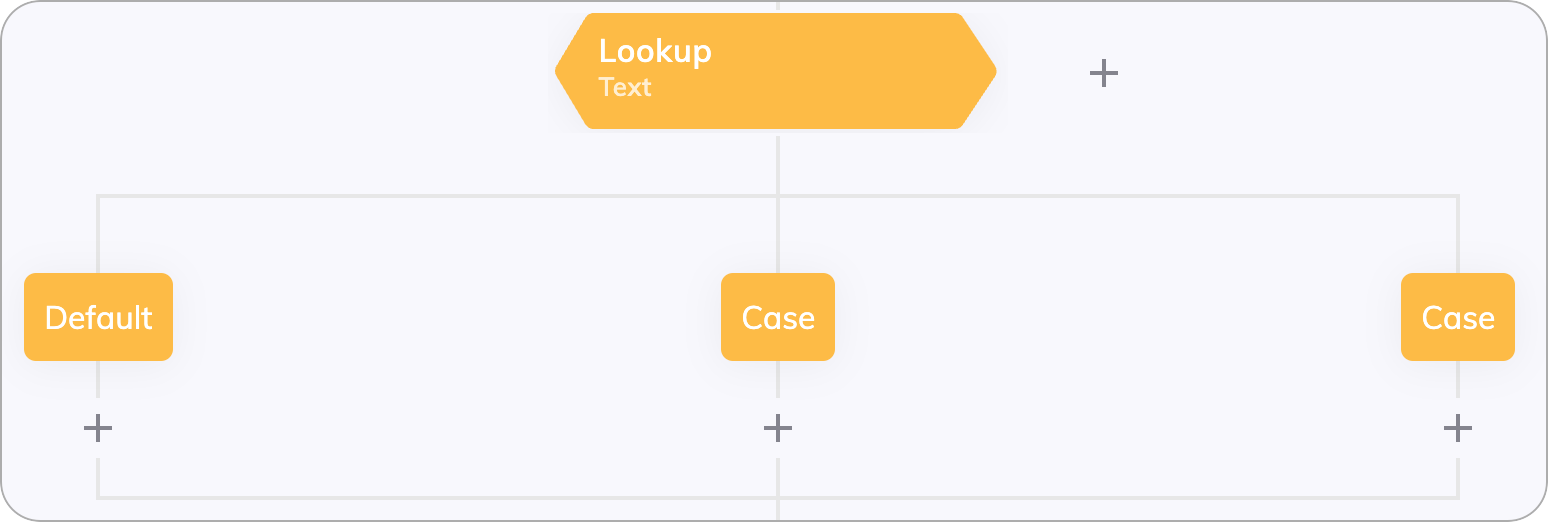
A Lookup Node creates different Flow paths based on a chosen operand.
The operand, also called lookup type, can be set to Intent, State, Type and Mode, or custom [CognigyScript](/ai/platform-features/cognigyscript). In the child Case Nodes, the specific values for the selected operand are entered. The operand is evaluated during the execution of the Flow, and the result is compared with the values of each case. If there is a match, the Flow path of the matched case is executed. If there is no case match, the Default Node is executed.
## Parameters
Lookup Case Nodes are case-sensitive. Ensure that you use the correct upper or
lower case spelling in the **Value** field of your Case Nodes.
### Type
This is the default setting for the Lookup Node, and it allows you to easily look up the Intent that has been triggered.
By default, the Intent at the most detailed [Intent Hierarchy](/ai/platform-features/nlu/intents/intent-hierarchy/overview) level is matched. In this case, the Intents of all three levels are selectable in the Intent dropdown menu of the Case Nodes.
However, you can also select a level via the **Intent Level** list if Intents should be matched only on a certain hierarchy level. In this case, only the Intents of the chosen level are selectable in the **Intent** list of the Case Nodes.
For more information about building Flows with Intents, refer to the [NLU Overview](/ai/platform-features/nlu/overview) page.
{" "}
By changing the lookup type to **Text**, the Flow selects a case that matches
the value of `input.text`. The case values must manually be written for this
type of lookup.
By changing the lookup type to State, the Flow selects a case that matches the value of `input.state`. The case values must manually be written for this type of lookup.
States allow limitations to be placed on a conversation that restrict the valid Intents that the NLU has access to. You can use [Intent Conditions](/ai/platform-features/nlu/intents/conditions) as an alternative for controlling Intent recognition.
By changing the lookup type to **Type**, the Flow selects a case that matches the value of `input.type`. The case values must manually be written for this type of lookup.
The Type is defined as a classification of the last user message as determined by the NLU. The type is an [Input](/ai/agents/develop/ai-agent-memory/input) variable that can be one of the following values: Statement, Command, Greeting, BGreeting, whQuestion, howQuestion, ynQuestion, pAnswer or nAnswer.
By changing the lookup type to Mode, the Flow selects a case that matches the value of `input.mode`. The case values must manually be written for this type of lookup.
The Mode provides information on what was contained in the last user message. The type is an [Input](/ai/agents/develop/ai-agent-memory/input) variable that can be one of the following values: *TextOnly or TextData.* (Data only messages have an implicitly defined text that includes `DATA_ONLY_MESSAGE_` followed by a randomly generated string of 20 characters)
By changing the lookup type to **Handover Status**,
the Flow selects a case that matches the value of `input.handover.status`.
The case values must manually be written for a type of lookup.
You can now receive **Status** and queue update messages from **Genesys Cloud** using the **Handover Status** Node. To learn how to do that, go to [Genesys Status and Bot Messages](/ai/escalate/handover-reference/genesys-cloud-open-messaging). If you wish to use RingCentral Engage instead, go to [RingCentral Engage](/ai/escalate/handover-reference/ring-central-engage) for more information.
The table below shows handover statuses that you can configure in the Case Node.
| Status | Description | Restrictions |
| ---------------------------- | ---------------------------------------------------------------------------------------------------------------------------------------------------------------------------------------------------------------------------------------------------------------------------------------------------------------------------------------------------------------------------------------------------------------------------------------------------------------------------------------------------------------------------------------------------------------------------------------------------------------------------------------------------------------------------------------------------------------------------------------------------------------------------------------------------------------------------------------------------------------------------------------------------------------------------------------------------------------------------------------------------------------------------------------------------------------------------------------------------------------------------------------------------------------------------------------------------------- | ---------------------------------------------------------------------------------------------------------------------------------------------------------------------------------------------------------------------------------------------------------------------------------------------------------------------------------------------------------------------------------------------------------------------------------------------------------- |
| Completed | Conversations are resolved successfully. Agent assistance is provided. | - |
| Cancelled | Conversations are ended by users, indicating termination before resolution. | - |
| Error | Conversations are encountering issues. This issues could be technical, communicative, or related to misinformation. Human agents work to address the issue and guide the conversation back to its intended course. | - |
| Events | Conversations are triggered by specific occurrences significant to the conversation. These could be time-sensitive events, important updates, or prompts that guide the conversation's direction or provide additional context. | - |
| Active | Conversations are actively managed by a human agent. | - |
| Queue | Conversations are on hold, awaiting agent assignment. The end user can receive a message if a Say Node is placed under the Case Node. The Say Node should contain the following text:
## Description
A Lookup Node creates different Flow paths based on a chosen operand.
The operand, also called lookup type, can be set to Intent, State, Type and Mode, or custom [CognigyScript](/ai/platform-features/cognigyscript). In the child Case Nodes, the specific values for the selected operand are entered. The operand is evaluated during the execution of the Flow, and the result is compared with the values of each case. If there is a match, the Flow path of the matched case is executed. If there is no case match, the Default Node is executed.
## Parameters
Lookup Case Nodes are case-sensitive. Ensure that you use the correct upper or
lower case spelling in the **Value** field of your Case Nodes.
### Type
This is the default setting for the Lookup Node, and it allows you to easily look up the Intent that has been triggered.
By default, the Intent at the most detailed [Intent Hierarchy](/ai/platform-features/nlu/intents/intent-hierarchy/overview) level is matched. In this case, the Intents of all three levels are selectable in the Intent dropdown menu of the Case Nodes.
However, you can also select a level via the **Intent Level** list if Intents should be matched only on a certain hierarchy level. In this case, only the Intents of the chosen level are selectable in the **Intent** list of the Case Nodes.
For more information about building Flows with Intents, refer to the [NLU Overview](/ai/platform-features/nlu/overview) page.
{" "}
By changing the lookup type to **Text**, the Flow selects a case that matches
the value of `input.text`. The case values must manually be written for this
type of lookup.
By changing the lookup type to State, the Flow selects a case that matches the value of `input.state`. The case values must manually be written for this type of lookup.
States allow limitations to be placed on a conversation that restrict the valid Intents that the NLU has access to. You can use [Intent Conditions](/ai/platform-features/nlu/intents/conditions) as an alternative for controlling Intent recognition.
By changing the lookup type to **Type**, the Flow selects a case that matches the value of `input.type`. The case values must manually be written for this type of lookup.
The Type is defined as a classification of the last user message as determined by the NLU. The type is an [Input](/ai/agents/develop/ai-agent-memory/input) variable that can be one of the following values: Statement, Command, Greeting, BGreeting, whQuestion, howQuestion, ynQuestion, pAnswer or nAnswer.
By changing the lookup type to Mode, the Flow selects a case that matches the value of `input.mode`. The case values must manually be written for this type of lookup.
The Mode provides information on what was contained in the last user message. The type is an [Input](/ai/agents/develop/ai-agent-memory/input) variable that can be one of the following values: *TextOnly or TextData.* (Data only messages have an implicitly defined text that includes `DATA_ONLY_MESSAGE_` followed by a randomly generated string of 20 characters)
By changing the lookup type to **Handover Status**,
the Flow selects a case that matches the value of `input.handover.status`.
The case values must manually be written for a type of lookup.
You can now receive **Status** and queue update messages from **Genesys Cloud** using the **Handover Status** Node. To learn how to do that, go to [Genesys Status and Bot Messages](/ai/escalate/handover-reference/genesys-cloud-open-messaging). If you wish to use RingCentral Engage instead, go to [RingCentral Engage](/ai/escalate/handover-reference/ring-central-engage) for more information.
The table below shows handover statuses that you can configure in the Case Node.
| Status | Description | Restrictions |
| ---------------------------- | ---------------------------------------------------------------------------------------------------------------------------------------------------------------------------------------------------------------------------------------------------------------------------------------------------------------------------------------------------------------------------------------------------------------------------------------------------------------------------------------------------------------------------------------------------------------------------------------------------------------------------------------------------------------------------------------------------------------------------------------------------------------------------------------------------------------------------------------------------------------------------------------------------------------------------------------------------------------------------------------------------------------------------------------------------------------------------------------------------------------------------------------------------------------------------------------------------------- | ---------------------------------------------------------------------------------------------------------------------------------------------------------------------------------------------------------------------------------------------------------------------------------------------------------------------------------------------------------------------------------------------------------------------------------------------------------- |
| Completed | Conversations are resolved successfully. Agent assistance is provided. | - |
| Cancelled | Conversations are ended by users, indicating termination before resolution. | - |
| Error | Conversations are encountering issues. This issues could be technical, communicative, or related to misinformation. Human agents work to address the issue and guide the conversation back to its intended course. | - |
| Events | Conversations are triggered by specific occurrences significant to the conversation. These could be time-sensitive events, important updates, or prompts that guide the conversation's direction or provide additional context. | - |
| Active | Conversations are actively managed by a human agent. | - |
| Queue | Conversations are on hold, awaiting agent assignment. The end user can receive a message if a Say Node is placed under the Case Node. The Say Node should contain the following text:
`Estimated time: {{input.data.request.estimatedWaitTime / (1000 * 60)}} seconds`
`Position: {{input.data.request.position}}`
Where `Estimated time` is the approximate duration in seconds that the user must wait for a response from a human agent, and `Position` is the conversation's order in the queue.
If you use the [Agent Copilot workspace](/agent-copilot/index) in your contact center, you should add the Handover Node and Lookup Node with the Queue status in your Agent Copilot Flow, along with a Say Node. In the Main Flow, after the Case Node with the Queue status, add the Go To Node that leads to the Agent Copilot Flow and its Lookup Node. | The status is applicable only to the following handover providers:- [RingCentral Engage](/ai/escalate/handover-reference/ring-central-engage) when the [Get Queue Updates](/ai/escalate/handover-reference/ring-central-engage) setting is activated.
- [Cognigy Live Agent](/ai/escalate/handover-features/real-time-queue-notifications).
- [Salesforce MIAW](/ai/escalate/handover-features/real-time-queue-notifications).
|
| Handover Already in Progress | Conversations maintain a handover connection when a user with the same ID opens multiple conversations. In this scenario, when the user opens a new conversation, the first conversation with the human agent becomes inactive. The chat continues in the new conversation with the human agent. No new handover is created, and the human agent has access to the history of both conversations with the user in one chat window.
To inform the user that the first chat is inactive, add a Say Node after the Case Node. This message appears if the user revisits the first conversation. If the user creates multiple conversations, each chat displays this message, except for the last one that the user opened.
If you use the [Agent Copilot workspace](/agent-copilot/index) in your contact center, you should add the Handover Node and Lookup Node with the Handover Already in Progress status in your Agent Copilot Flow, along with a Say Node to inform the user that the first chat is inactive. In the Main Flow, after the Case Node with the Handover Already in Progress status, add the Go To Node that leads to the Agent Copilot Flow and its Lookup Node. | The status is applicable only to the [Genesys Cloud Messaging](/ai/escalate/handover-reference/genesys-cloud-open-messaging) provider. |
| `genricHandoverUpdate` | Conversations include messages from the Genesys Bot. By default, the Genesys Inbound Message flow routes messages to human agents only. However, you can configure your settings so that these messages are sent not only to human agents but also to end users. For more information, refer to the [Send Genesys Bot Messages to End Users](/ai/escalate/handover-reference/genesys-cloud-open-messaging) section. | The status is applicable only to the [Genesys Cloud Messaging](/ai/escalate/handover-reference/genesys-cloud-open-messaging) provider. |
If you choose CognigyScript as the operand, use CognigyScript without `{{ }}`. You can also select to parse the CognigyScript as a string or not.
By changing the lookup type to **CognigyScript**, the Flow selects a case that matches the value of any variable that is entered in the "Operator" field, either by using a *token* or by writing the variable path in *CognigyScript*. This feature makes it possible to change the Flow path based on any variable in the `input`, `context` or `profile`. The case values must manually be written for this type of lookup.
To learn more, read the [CognigyScript](/ai/platform-features/cognigyscript) page.
By changing the lookup type to **Call Event Status**, the Flow selects a case that matches the value of `input.data.event`. The case values must manually be written for this type of lookup.
In the Case Node, you can handle various Voice Gateway events, including Recognized Speech, Recognized DTMF, Call Created, Answering Machine Detection, and more.
More information about these events you can find in the [Voice Gateway Events](/voice-gateway/references/events/overview) reference.
### Advanced
#### Strict Mode
By default, the Strict Mode setting is inactive, which lets the Lookup Node accept values of any data type from the Input, Context, or Profile objects.
For instance, if you use CognigyScript to retrieve a value in integer format (for example, `2024`), it is considered equal to the string format (for example, `"2024"`)
in the **Value** field of the Case Node.
In Strict Mode, value types must be identical.
For example, the integer `2024` and the string `"2024"` aren't considered equal.
This mode is useful when strict type matching is necessary to ensure data is processed correctly.
When Strict Mode is enabled, the value retrieved from the Input, Context, or Profile objects must match the type of the value specified in the Case Node.
To achieve this result, in the **Value** field of the Case Node, convert the string to the required format using JavaScript.
For example, to convert the string `"2024"` to the integer `2024`, use `{{ Number("2024") }}` or CognigyScript to retrieve the value: `{{ Number(input.currentTime.year) }}`.
## An Alternative to Nested If Nodes
Lookup Nodes are useful when the number of possible options becomes too large for If Nodes.
Rather than using a series of conditional statements like if `input.intent === "orderFood"`, `else if input.intent === "orderDrink"`, `else if input.intent === "askHelp"`, and so on, you can simplify the process by using a Lookup on the Intent with multiple cases (`orderFood`, `orderDrink`, `askHelp`) and a default option.