> ## Documentation Index
> Fetch the complete documentation index at: https://docs.cognigy.com/llms.txt
> Use this file to discover all available pages before exploring further.
# DTMF
 ## Description
The DTMF Node sends RTP payloads to the caller's SIP provider to play DTMF digit tones to the caller. If the caller's SIP provider supports RTP payloads according to [RFC 2833](https://datatracker.ietf.org/doc/html/rfc2833), the customer will hear the voice tones of the DTMF digits.
This Node is useful when paired with a [Handover to Human Agent](/ai/agents/develop/node-reference/service/handover-to-agent) Node or a [Transfer](/ai/agents/develop/node-reference/voice/voice-gateway/transfer) Node.
By playing the DTMF digit tones,
the DTMF Node informs the caller
that they are being transferred to another agent — either a voice AI Agent or a human agent in a contact center.
The Node can also be used in combination with DTMF input
(the **Capture DTMF Signals** parameter in the [Set Session Config](/ai/agents/develop/node-reference/voice/voice-gateway/set-session-config) Node) to provide feedback on the caller's input.
For example, after a caller enters digits, the system plays back the corresponding DTMF tones for each digit entered to confirm the input.
## Parameters
| Parameter | Type | Description |
| --------------- | ------ | -------------------------------------------------------------------------------------------------------------------------------------------------------------------- |
| Digits Sequence | Text | Specifies the sequence of digits to be played to the caller. The sequence of digits can be a telephone extension code or the number for the customer service center. |
| Pause time | Slider | Specifies the pause length in milliseconds (ms), between each DTMF digit tone. The default value is 500 ms. |
## Example
A company provides an option
for customers to order equipment by leaving a voice message with the details about the equipment
or to get assistance with equipment they have already received.
An AI Agent guides the customer through this process using DTMF digit tones.
To build a Flow with the DTMF Node for the previous example, follow these steps:
1. In the Flow editor, click **+** and select **Extensions > VG > Set Session Config**.
2. In the **DTMF** section of the **Set Session Config** Node, activate the **Capture DTMF Signals** parameter, remove `#` from the **DTMF Submit Digit** field, and save.
3. Below the Set Session Config Node, add a Question Node and configure the following settings:
* **Question Type**: select **Number**.
* **Output Type**: Select **Text**.
* **Text**:`Hello! Welcome to our Support. We can help you with your equipment needs. If you want to place an order for equipment, press 1. If you have already received your equipment and need help with setup or are experiencing issues, press 2.`
4. Below the Question Node, add a Lookup Node, select the **Text** type, and click **Save Node**.
5. Configure the logic in the branch for the first Case Node:
1. In the **Value** field, specify `1`.
2. Below the Case Node, add a Say Node. In the **Text** field of the Say Node, specify the following sentence: `After the signal, please leave a voice message with the information about the equipment you wish to order, and we will call you back`.
3. Below the Say Node, add a DTMF Node. Specify `1` in the **Digit Sequence** field to correspond the tone to the dial number that the caller presses.
4. (*Optional*) Add a Call Recording Node to record the caller speech.
6. Configure the logic in the branch for the second Case Node:
1. In the **Value** field, specify `2`.
2. Below the second Case Node, add a Say Node. In the **Text** field of the Say Node, specify the following sentence: `After the signal, you will be transferred to a contact center`.
3. Below the second Say Node, add another DTMF Node. Specify `2` in the **Digit Sequence** field to correspond the tone to the dial number that the caller presses.
4. Add a Handover to Human Agent Node to route the caller to the contact center.
## Description
The DTMF Node sends RTP payloads to the caller's SIP provider to play DTMF digit tones to the caller. If the caller's SIP provider supports RTP payloads according to [RFC 2833](https://datatracker.ietf.org/doc/html/rfc2833), the customer will hear the voice tones of the DTMF digits.
This Node is useful when paired with a [Handover to Human Agent](/ai/agents/develop/node-reference/service/handover-to-agent) Node or a [Transfer](/ai/agents/develop/node-reference/voice/voice-gateway/transfer) Node.
By playing the DTMF digit tones,
the DTMF Node informs the caller
that they are being transferred to another agent — either a voice AI Agent or a human agent in a contact center.
The Node can also be used in combination with DTMF input
(the **Capture DTMF Signals** parameter in the [Set Session Config](/ai/agents/develop/node-reference/voice/voice-gateway/set-session-config) Node) to provide feedback on the caller's input.
For example, after a caller enters digits, the system plays back the corresponding DTMF tones for each digit entered to confirm the input.
## Parameters
| Parameter | Type | Description |
| --------------- | ------ | -------------------------------------------------------------------------------------------------------------------------------------------------------------------- |
| Digits Sequence | Text | Specifies the sequence of digits to be played to the caller. The sequence of digits can be a telephone extension code or the number for the customer service center. |
| Pause time | Slider | Specifies the pause length in milliseconds (ms), between each DTMF digit tone. The default value is 500 ms. |
## Example
A company provides an option
for customers to order equipment by leaving a voice message with the details about the equipment
or to get assistance with equipment they have already received.
An AI Agent guides the customer through this process using DTMF digit tones.
To build a Flow with the DTMF Node for the previous example, follow these steps:
1. In the Flow editor, click **+** and select **Extensions > VG > Set Session Config**.
2. In the **DTMF** section of the **Set Session Config** Node, activate the **Capture DTMF Signals** parameter, remove `#` from the **DTMF Submit Digit** field, and save.
3. Below the Set Session Config Node, add a Question Node and configure the following settings:
* **Question Type**: select **Number**.
* **Output Type**: Select **Text**.
* **Text**:`Hello! Welcome to our Support. We can help you with your equipment needs. If you want to place an order for equipment, press 1. If you have already received your equipment and need help with setup or are experiencing issues, press 2.`
4. Below the Question Node, add a Lookup Node, select the **Text** type, and click **Save Node**.
5. Configure the logic in the branch for the first Case Node:
1. In the **Value** field, specify `1`.
2. Below the Case Node, add a Say Node. In the **Text** field of the Say Node, specify the following sentence: `After the signal, please leave a voice message with the information about the equipment you wish to order, and we will call you back`.
3. Below the Say Node, add a DTMF Node. Specify `1` in the **Digit Sequence** field to correspond the tone to the dial number that the caller presses.
4. (*Optional*) Add a Call Recording Node to record the caller speech.
6. Configure the logic in the branch for the second Case Node:
1. In the **Value** field, specify `2`.
2. Below the second Case Node, add a Say Node. In the **Text** field of the Say Node, specify the following sentence: `After the signal, you will be transferred to a contact center`.
3. Below the second Say Node, add another DTMF Node. Specify `2` in the **Digit Sequence** field to correspond the tone to the dial number that the caller presses.
4. Add a Handover to Human Agent Node to route the caller to the contact center.
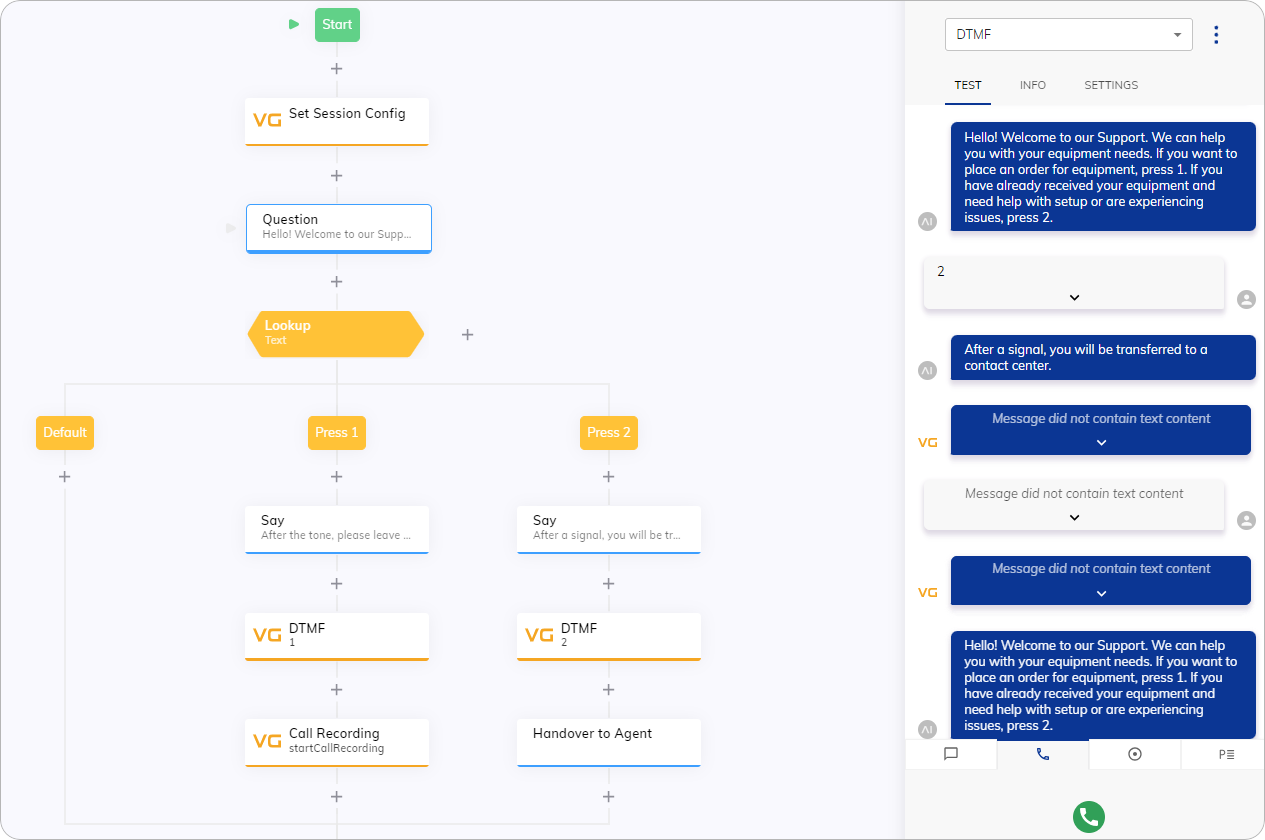 Test your Flow via the Interaction Panel. Use the [Voice Call](/ai/agents/test/interaction-panel/voice-call) setting.
## More Information
* [DTMF Parameter](/ai/agents/develop/node-reference/voice/voice-gateway/parameter-details)
* [DTMF Verb](/voice-gateway/references/verbs/dtmf)
* [DTMF Collect Config](/ai/agents/develop/node-reference/voice/generic/dtmf-collect-config)
Test your Flow via the Interaction Panel. Use the [Voice Call](/ai/agents/test/interaction-panel/voice-call) setting.
## More Information
* [DTMF Parameter](/ai/agents/develop/node-reference/voice/voice-gateway/parameter-details)
* [DTMF Verb](/voice-gateway/references/verbs/dtmf)
* [DTMF Collect Config](/ai/agents/develop/node-reference/voice/generic/dtmf-collect-config)