> ## Documentation Index
> Fetch the complete documentation index at: https://docs.cognigy.com/llms.txt
> Use this file to discover all available pages before exploring further.
# Interaction Panel
Updated in 2026.1
The *Interaction Panel* offers a robust interface for testing chat and voice AI Agents. You can run different tests and analyze how AI Agents respond. This approach allows you to evaluate the AI Agents' performance and change their communication and service skills.
The Interaction Panel provides the following features:
* **Three Testing Modes**. Test your AI Agent across all Channels with the [chat](/ai/agents/test/interaction-panel/chat), [voice call](/ai/agents/test/interaction-panel/voice-call), and [live follow](/ai/agents/test/interaction-panel/live-follow) modes to simulate real-world interactions.
* **Memory Inspection and Extraction**. View and extract the data stored in the [AI Agent's memory](/ai/agents/develop/ai-agent-memory/overview) to analyze its behavior, as well as to identify potential areas for improvement.
* **Playbooks**. Use [Playbooks](/ai/agents/test/playbooks) to save time by automating repetitive tasks and catching errors efficiently.
* **Flexible Configuration**. Design custom test scenarios for in-depth analysis of your AI Agent's behavior.
## Prerequisites
* You must have a [Flow](/ai/agents/develop/projects-and-flows/overview) with configured [Nodes](/ai/agents/develop/nodes/overview) to test the AI Agent.
## Explore the Interaction Panel
To open the Interaction Panel, click  in the upper-right corner. You can open the Interaction Panel from any page within your Project and set the Flow, [Locale](/ai/platform-features/translation-and-localization/localization), and [Snapshot](/ai/agents/deploy/snapshots) you want to test. However, when opened from the Flow Editor, the Interaction Panel uses the current Flow configuration and allows you to follow the Flow execution in real time.
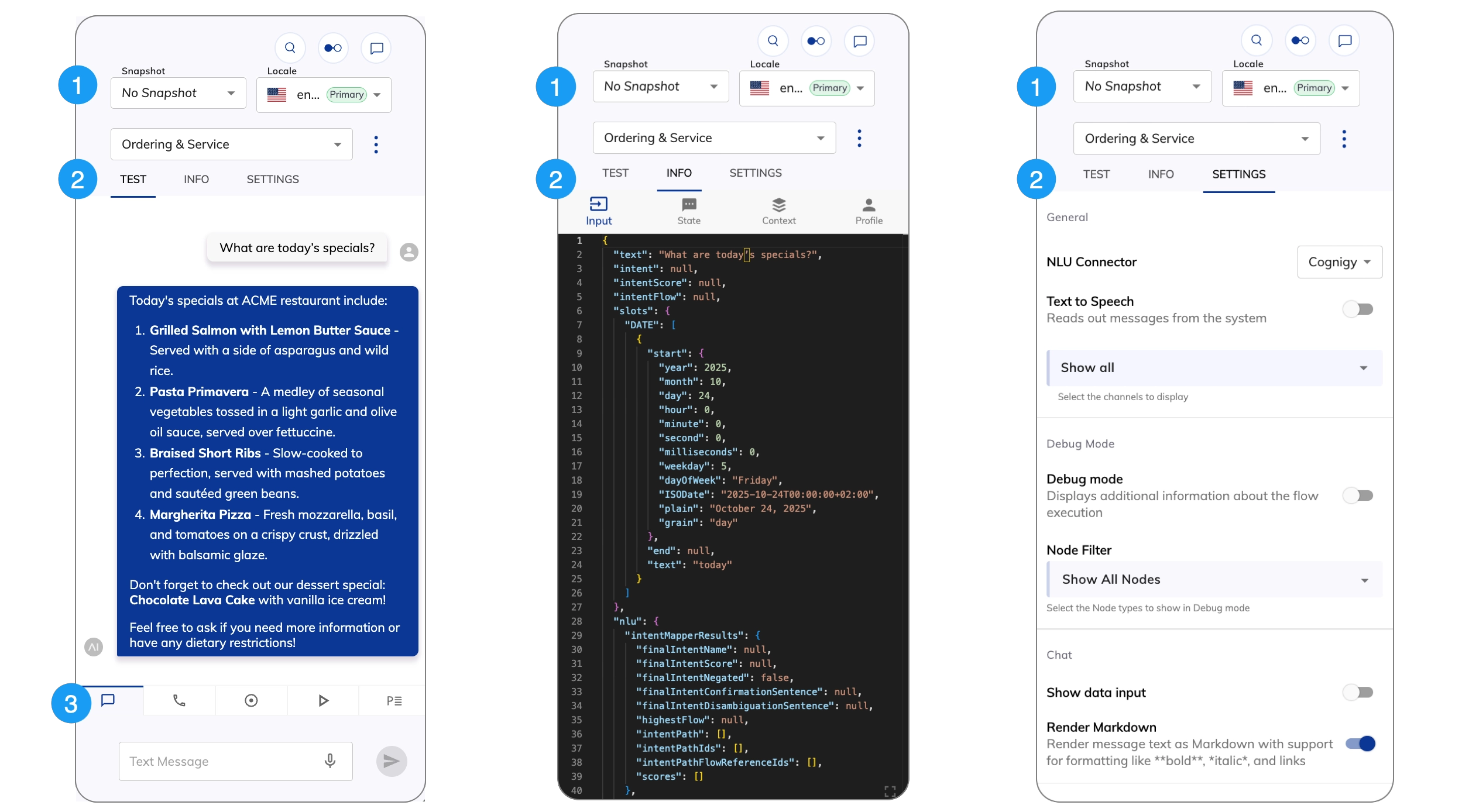 | UI Element | Type | Description |
| ------------------------------------------------------------------------------------------------------------------------------------------------------------------------------------------------------------------------------------------------------------------------------------------------------------------------------------------------------------------------------------------------------------------------------------------------------------------------------------------------------------------------------------------------------------------------------------------------------------------------------------------------------------------------------------------------------------------------------------------------------------------------------------------------------------------------------------------------------------------------------------------------------------------------------------------------------------------------------------------------------------------------------------------------------------------------------------------------------------------------------------------------------------------------------------------------------------------------------------------------------------------------------------------------------------------------------------------------------------------------------------------------------------------------------------------------------------------------------------------------------------------------------------------------------------------------------------------------------------------------------------------ | ----------- | ---------------------------------------------------------------------------------------------------------------------------------------------------------------------------------------------------------------------------------------------------------------------------------------------------------------------------------------------------------------------------------------------------------------------------------------------------------------------------------------------------------------------------------------------------------------------------------- |
| Snapshot | List | This setting is optional. If applicable, you can select the Snapshot of a Project to test your AI Agent. |
| Locale | List | Define the language your AI Agent should use for testing. |
| Flow | List | Select the Flow you want to test with the AI Agent. |
|
| UI Element | Type | Description |
| ------------------------------------------------------------------------------------------------------------------------------------------------------------------------------------------------------------------------------------------------------------------------------------------------------------------------------------------------------------------------------------------------------------------------------------------------------------------------------------------------------------------------------------------------------------------------------------------------------------------------------------------------------------------------------------------------------------------------------------------------------------------------------------------------------------------------------------------------------------------------------------------------------------------------------------------------------------------------------------------------------------------------------------------------------------------------------------------------------------------------------------------------------------------------------------------------------------------------------------------------------------------------------------------------------------------------------------------------------------------------------------------------------------------------------------------------------------------------------------------------------------------------------------------------------------------------------------------------------------------------------------------ | ----------- | ---------------------------------------------------------------------------------------------------------------------------------------------------------------------------------------------------------------------------------------------------------------------------------------------------------------------------------------------------------------------------------------------------------------------------------------------------------------------------------------------------------------------------------------------------------------------------------- |
| Snapshot | List | This setting is optional. If applicable, you can select the Snapshot of a Project to test your AI Agent. |
| Locale | List | Define the language your AI Agent should use for testing. |
| Flow | List | Select the Flow you want to test with the AI Agent. |
|  | Action menu | Use this menu to:
 - **Reset Session** — clear the chat history in the Interaction Panel.
- **Create Playbook** — create a new Playbook for testing conversations. For more information, refer to [Playbooks](/ai/agents/test/playbooks).
- **Create Playbook with Assertions** — create a new Playbook with [Assertions](/ai/agents/test/playbooks#working-with-playbooks) for in-depth testing.
- **Enable/Disable Debug Mode** — toggle the [Debug mode](/ai/agents/test/interaction-panel/chat#debug-mode). Debug mode is enabled by default.
|
| Tab | Description |
| -------- | ------------------------------------------------------------------------------------------------ |
| Test | Interact with your AI Agent. |
| Info | Examine the data stored in the [AI Agent's memory](/ai/agents/develop/ai-agent-memory/overview). |
| Settings | [Configure the Interaction Panel](#configure-the-interaction-panel). |
| Tab | Description |
| ------------------------------------------------------------------------------------------------------------------------------------------------------------------------------------------------------------------------------------------------------------------------------------------------------------------------------------------------------------------------------------------------------------------------------------------------------------------------------------------------------------------------------------------------------------------------------------------------------------------------------------------------------------------------------------------------------------------------------------------------------------------------------------------------------------------------------------------------------------------------------------------------------------------------------------------------------------------------------------------------------------------------------------------------------------------------------------------------------------------------------------------------------------------------------------------------------------------------------------------------------------------------------------------------------------------------------------------------------------------------------------------------------------------------------------------------------------------------------------------------------------------------------------------------------------------------------------------------------------------------------------------------------------------------------------------------------------------------------------ | ------------------------------------------------------------------------------------------------------------- |
|  | Test your chat AI Agent in the [Chat panel](/ai/agents/test/interaction-panel/chat). |
|
| Test your chat AI Agent in the [Chat panel](/ai/agents/test/interaction-panel/chat). |
|  | Test your voice AI Agent in the [Voice Call panel](/ai/agents/test/interaction-panel/voice-call). |
|
| Test your voice AI Agent in the [Voice Call panel](/ai/agents/test/interaction-panel/voice-call). |
|  | Monitor your AI Agent in real time in the [Live Follow panel](/ai/agents/test/interaction-panel/live-follow). |
|
| Monitor your AI Agent in real time in the [Live Follow panel](/ai/agents/test/interaction-panel/live-follow). |
|  | Run [simulated conversations](/ai/agents/test/interaction-panel/simulation) using LLMs. |
|
| Run [simulated conversations](/ai/agents/test/interaction-panel/simulation) using LLMs. |
|  | Test your AI Agent using a [Playbook](/ai/agents/test/playbooks). |
## Configure the Interaction Panel
| Setting | Type | Description |
| --------------------------------- | ------ | ---------------------------------------------------------------------------------------------------------------------------------------------------------------------------------------------------------------------------------------------------------------------------------------------------------------------------------------------------------------------------------------------------------------------------- |
| **General** | | |
| NLU Connector | List | Allows you to select third-party NLU engines to use in the Interaction Panel. To install a new NLU engine in Cognigy.AI, go to **Build > NLU Connectors** and click **+ New NLU Connector**. For more information on how to manage NLU connectors, refer to [NLU Connectors](/ai/platform-features/nlu/external/nlu-connectors/overview). The default is the Cognigy NLU engine. |
| Text to Speech | Toggle | Allows the AI Agent vocalizes the responses using your browser's built-in Text-to-Speech (TTS) functionality. |
| Channel Selection | List | Select the Channels you want to display in the Interaction Panel, such as Webchat, Voice Gateway, Slack, and more. The **Show all** option is selected by default. |
| **Debug Mode** | | |
| Debug mode | Toggle | Activates [Debug mode](/ai/agents/test/interaction-panel/chat#debug-mode). |
| Node Filter | List | Select the Node types to show in Debug mode. |
| **Chat** | | |
| Show Data Input | Toggle | Displays the **Data Input** field below the standard text input field in the Interaction Panel, allowing you to enter JSON data with or without a text message. For example, `{"firstName": "Max", "lastName": "Müller"}`. |
| Render Markdown | Toggle | Enables Markdown rendering for AI Agent text outputs. Supports basic formatting like italics, bold, links, and headers, as well as advanced features such as tables, footnotes, and nested lists. Formulas aren't supported. This parameter is disabled by default and matches the behavior of the Webchat v3 [Render Markdown](/webchat/v3/configuration#webchat-behavior) option. |
| **Voice Call** | | |
| Language | List | Select a language for the AI Agent. The supported languages depend on the [configured voice provider](/ai/agents/test/voice-preview). The **Custom** option lets you use a TTS language that isn't in the list. The format depends on the TTS Vendor, for example, `de-DE`, `fr-FR`, `en-US`. |
| Voice | List | Select a female or male speaker's voice. This setting applies to region-specific voices as well. The format depends on the TTS Vendor, for example, `de-DE-ConradNeural`. |
| **Playbooks** | | |
| Repeat | Toggle | Allows Playbook runs repeatedly until you explicitly stop it. This feature is helpful for testing use cases that need consistent behavior over many interactions. |
| Delay | Number | Set a waiting time between each Playbook Step execution in milliseconds (ms). The default value is 200 ms. |
| **Advanced** | | |
| Enable Mocking | Toggle | Activates [mocking](/ai/agents/test/mocking) for chat and simulation mode in the Interaction Panel. |
| Auto-Move Flow Editor | Toggle | Allows the Flow editor view to automatically:
| Test your AI Agent using a [Playbook](/ai/agents/test/playbooks). |
## Configure the Interaction Panel
| Setting | Type | Description |
| --------------------------------- | ------ | ---------------------------------------------------------------------------------------------------------------------------------------------------------------------------------------------------------------------------------------------------------------------------------------------------------------------------------------------------------------------------------------------------------------------------- |
| **General** | | |
| NLU Connector | List | Allows you to select third-party NLU engines to use in the Interaction Panel. To install a new NLU engine in Cognigy.AI, go to **Build > NLU Connectors** and click **+ New NLU Connector**. For more information on how to manage NLU connectors, refer to [NLU Connectors](/ai/platform-features/nlu/external/nlu-connectors/overview). The default is the Cognigy NLU engine. |
| Text to Speech | Toggle | Allows the AI Agent vocalizes the responses using your browser's built-in Text-to-Speech (TTS) functionality. |
| Channel Selection | List | Select the Channels you want to display in the Interaction Panel, such as Webchat, Voice Gateway, Slack, and more. The **Show all** option is selected by default. |
| **Debug Mode** | | |
| Debug mode | Toggle | Activates [Debug mode](/ai/agents/test/interaction-panel/chat#debug-mode). |
| Node Filter | List | Select the Node types to show in Debug mode. |
| **Chat** | | |
| Show Data Input | Toggle | Displays the **Data Input** field below the standard text input field in the Interaction Panel, allowing you to enter JSON data with or without a text message. For example, `{"firstName": "Max", "lastName": "Müller"}`. |
| Render Markdown | Toggle | Enables Markdown rendering for AI Agent text outputs. Supports basic formatting like italics, bold, links, and headers, as well as advanced features such as tables, footnotes, and nested lists. Formulas aren't supported. This parameter is disabled by default and matches the behavior of the Webchat v3 [Render Markdown](/webchat/v3/configuration#webchat-behavior) option. |
| **Voice Call** | | |
| Language | List | Select a language for the AI Agent. The supported languages depend on the [configured voice provider](/ai/agents/test/voice-preview). The **Custom** option lets you use a TTS language that isn't in the list. The format depends on the TTS Vendor, for example, `de-DE`, `fr-FR`, `en-US`. |
| Voice | List | Select a female or male speaker's voice. This setting applies to region-specific voices as well. The format depends on the TTS Vendor, for example, `de-DE-ConradNeural`. |
| **Playbooks** | | |
| Repeat | Toggle | Allows Playbook runs repeatedly until you explicitly stop it. This feature is helpful for testing use cases that need consistent behavior over many interactions. |
| Delay | Number | Set a waiting time between each Playbook Step execution in milliseconds (ms). The default value is 200 ms. |
| **Advanced** | | |
| Enable Mocking | Toggle | Activates [mocking](/ai/agents/test/mocking) for chat and simulation mode in the Interaction Panel. |
| Auto-Move Flow Editor | Toggle | Allows the Flow editor view to automatically: - Center on the last executed Node in the current Flow.
- Open another Flow that is triggered during the Flow execution and centers on the triggered Node.
The setting is activated by default. |
| Auto-Switch Target Flow Selection | Toggle | Automatically switches between Flows in the Interaction Panel when another Flow is opened in the editor. The setting is disabled by default. Example: A project includes two Flows, Flow A and Flow B. The process starts according to Flow A and reaches a step that triggers Flow B. If this setting is activated, Flow B opens in the editor, and the Interaction Panel automatically switches to Flow B in its settings. |
## More Information
* [Cognigy Script and Objects Lifespan](/ai/agents/develop/ai-agent-memory/overview#lifespan-of-cognigy-ai-objects)
* [Testing your AI Agents with Playbooks](https://support.cognigy.com/hc/en-us/articles/9585431937948-Best-Practices-Testing-your-Virtual-Agents-with-Playbooks#1-design-comprehensive-playbooks-0-0)
* [Voice Gateway Parameter Details](/ai/agents/develop/node-reference/voice/voice-gateway/parameter-details)