> ## Documentation Index
> Fetch the complete documentation index at: https://docs.cognigy.com/llms.txt
> Use this file to discover all available pages before exploring further.
# Annotations
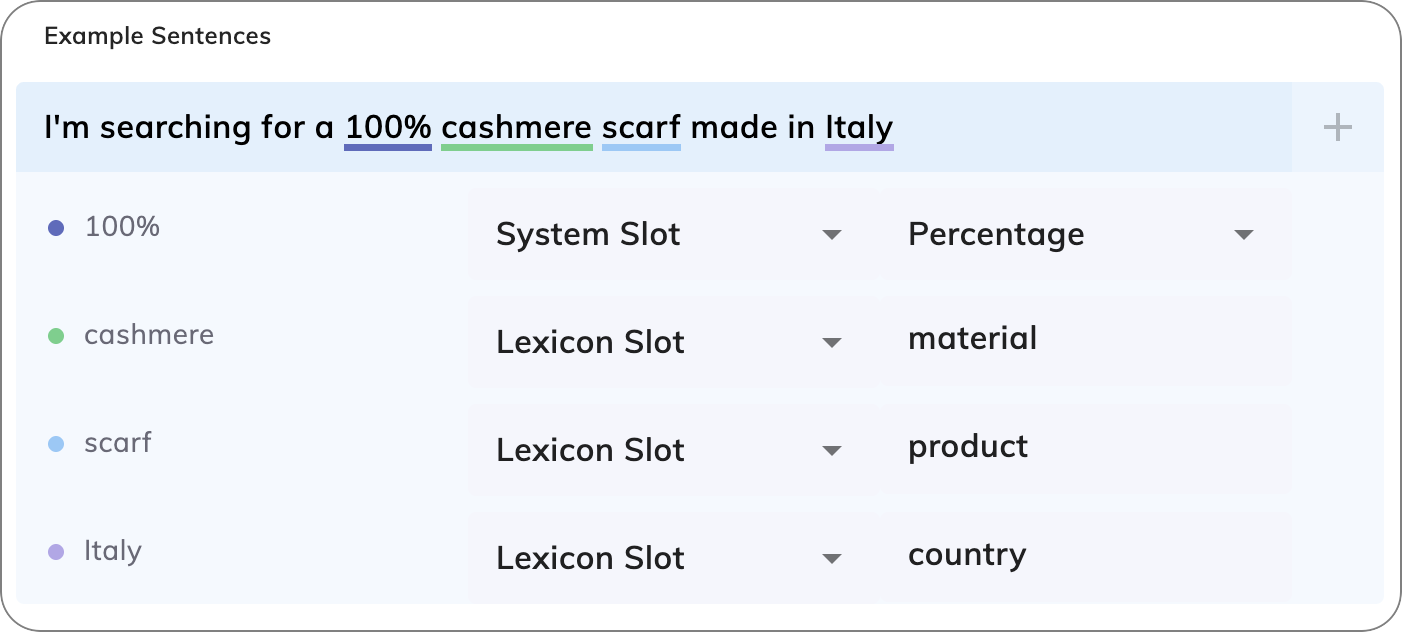
*Annotations* enable you to tag specific words within example sentences as placeholders.
These placeholders, linked to Slots, allow the NLU model to identify and extract key details from user inputs.
For example, in the sentence `I want a shirt`, you could annotate `shirt` as a placeholder tied to a `product` Slot,
helping the NLU recognize similar items, such as `pants` or `hats`.
## Key Benefits
* **Improved Detail Recognition**. Annotations help the NLU pinpoint and extract specific information, for example, names, dates, or products, from user inputs, making conversations more precise and context-aware.
* **Reduced Repetition**. By integrating Slots into example sentences, annotations eliminate the need to write repetitive variations.
## How to Use
To use Annotations, follow these steps:
1. In the Flow editor, go to **NLU > Intents** and select the desired Intent.
2. Highlight a word in an example sentence within the text field and click **+**. A row with two lists will appear.
3. Select **Slot Type** and **key** from the lists.
Multiple annotations can be added to a single sentence, each underlined in a unique color.
 ### Exact Matching
If two sentences are nearly identical but differ only in Keyphrases that share the same Slot, the NLU model detects them as highly similar.
In such cases, it automatically assigns a score of 0.95 to indicate a strong match.
#### Example
Example Sentence: `I want a burger`
### Exact Matching
If two sentences are nearly identical but differ only in Keyphrases that share the same Slot, the NLU model detects them as highly similar.
In such cases, it automatically assigns a score of 0.95 to indicate a strong match.
#### Example
Example Sentence: `I want a burger`
User Input: `I want a pizza`
Result: If `pizza` and `burger` are both tagged with the same `product` Slot in the Lexicon, the match score will be `0.95`.
### Recommendations
* **Annotate whole words or phrases**. When you annotate words or phrases by using a Lexicon Slot in an Example Sentence, annotate them as a whole to ensure correct matching. For example:
* In the sentence `I want a monthly subscription`
* If you assign only `month` to a Lexicon Slot, the NLU engine doesn't recognize `monthly`.
* If you assign `monthly` to the Lexicon Slot, the NLU engine recognizes the Intent correctly.
* In the sentence `Ich möchte ein monatliches Abonnement abschließen`
* If you assign only `monatlich` to a Lexicon Slot, the NLU engine doesn't recognize `monatliches`.
* If you assign `monatliches` to the Lexicon Slot, the NLU engine recognizes the Intent correctly.
* **Avoid selecting bordering spaces**. When highlighting a word for annotation, make sure you select only the word itself without leading or trailing spaces. For example, select `monthly` instead of ` monthly` or `monthly `. Including extra spaces in the selection can cause the NLU processing to fail.
* **Annotate only 50% of your example sentences with Slots for optimal Intent matching**. This balanced approach instructs the NLU model that the Slot is relevant to the Intent, while also indicating that identifying the Slot isn't mandatory for a successful Intent match.
* **Use common words instead of rare ones**. Replace hard-to-understand terms with simpler ones to help the NLU model understand the context better. For example, instead of `PremiumPayID`, you can use `credit card`. Alternatively, you can include `credit card` in the example sentence and annotate it with a [Lexicon Slot](/ai/platform-features/nlu/slots/user-defined/lexicon) that maps to `PremiumPayID`.
## More Information
* [Example Sentences](/ai/platform-features/nlu/intents/example-sentences)
* [Intents](/ai/platform-features/nlu/intents/overview)