> ## Documentation Index
> Fetch the complete documentation index at: https://docs.cognigy.com/llms.txt
> Use this file to discover all available pages before exploring further.
# Tokens
Updated in 2025.13
*Tokens* are visual representations of [CognigyScript](/ai/platform-features/cognigyscript) expressions that you store and reuse in Cognigy.AI. Cognigy.AI has a selection of default Tokens that are associated with Input, Context, and Profile objects.
Tokens automatically include curly brackets in the script. For this reason, you don't need to wrap the CognigyScript in the **Script** field or the Tokens in text fields with curly brackets.
## Restrictions
* Only Node text fields with the  icon support Tokens.
## Working with Tokens
In **Manage > Tokens**, you can view, create, and delete Tokens as well as copy their Reference ID.
Tokens include the following information:
* **Name** — the Token name displayed in Nodes and the Token Management Menu.
* **Script** — the CognigyScript expression used to access the data. You don't need to wrap the CognigyScript expression in `{{ }}`.
* **Type** — the category of the Token in the search list:
* **Input** — access to the data in the [Input](/ai/agents/develop/ai-agent-memory/input) object.
* **Context** — access to the data in the [Context](/ai/agents/develop/ai-agent-memory/context) object.
* **Profile** — access to the data in the [Profile](/ai/agents/develop/ai-agent-memory/profile) object.
* **Custom** — specific CognigyScript expression with access to the data in one or more [Cognigy objects](/ai/agents/develop/ai-agent-memory/overview#lifespan-of-cognigy-ai-objects). For example, `"Should your order " + context.customerOrderAmount + " be sent to " + profile.address + "?"`.
You can also create and use Tokens in the Node editor or create Tokens from [JSON editors](#create-and-use-tokens-in-the-node-editor).
Deleting a Token doesn't remove the CognigyScript from the Nodes that used the deleted Token.
### Default Tokens
Cognigy.AI provides a selection of default tokens that you can readily use in your Flows.
| Token | Type | Description | Target path |
| ---------------------------- | ------- | --------------------------------------------------------------------------------------------------------------------------------------------------------------------------------------------------------------------------------------------------------------------------------------- | ----------------------------------------------------------------- |
| AI Agent Description | Input | The description of the AI Agent, used to give context about the AI Agent's role. | `context.ai.description` |
| AI Agent Image URL | Input | The URL of the AI Agent's avatar. | `context.ai.imageUrl` |
| AI Agent Instructions | Input | System-level instructions used to guide the AI Agent's behavior during conversations. | `context.ai.instructions` |
| AI Agent Knowledge Store | Input | The Knowledge Store assigned to the AI Agent, used for answering questions based on external documents. | `context.ai.knowledgeStore` |
| AI Agent Name | Input | The display name of the AI Agent shown to users during conversations. | `context.ai.name` |
| AI Agent Output | Input | The response sent by the AI Agent after processing the prompt and context. | `input.aiAgentOutput` |
| AI Agent Reference ID | Input | The unique ID of the AI Agent used internally to identify and reference the specific AI Agent configuration. | `context.ai.referenceId` |
| Answer | Input | Displays the extracted Input. For example, if the user is asked for a number and the answer was `I like the number 7` the extracted answer is `7`. | `input.result` |
| Available Agents | Input | Displays the current available agents in your system. | `input.availableAgents` |
| Channel | Input | Displays the current used channel. For example, `adminconsole`. | `input.channel` |
| Current Flow Name | Input | Displays the current used Flow name. | `input.flowName` |
| Current Time | Input | Displays the current time. For example, `2024-01-08T15:14:59+01:00` | `input.currentTime.ISODate` |
| Data | Input | Displays the data payload of the message. | `input.data` |
| Execution | Input | Represents the number of processed Inputs for this conversation.
icon support Tokens.
## Working with Tokens
In **Manage > Tokens**, you can view, create, and delete Tokens as well as copy their Reference ID.
Tokens include the following information:
* **Name** — the Token name displayed in Nodes and the Token Management Menu.
* **Script** — the CognigyScript expression used to access the data. You don't need to wrap the CognigyScript expression in `{{ }}`.
* **Type** — the category of the Token in the search list:
* **Input** — access to the data in the [Input](/ai/agents/develop/ai-agent-memory/input) object.
* **Context** — access to the data in the [Context](/ai/agents/develop/ai-agent-memory/context) object.
* **Profile** — access to the data in the [Profile](/ai/agents/develop/ai-agent-memory/profile) object.
* **Custom** — specific CognigyScript expression with access to the data in one or more [Cognigy objects](/ai/agents/develop/ai-agent-memory/overview#lifespan-of-cognigy-ai-objects). For example, `"Should your order " + context.customerOrderAmount + " be sent to " + profile.address + "?"`.
You can also create and use Tokens in the Node editor or create Tokens from [JSON editors](#create-and-use-tokens-in-the-node-editor).
Deleting a Token doesn't remove the CognigyScript from the Nodes that used the deleted Token.
### Default Tokens
Cognigy.AI provides a selection of default tokens that you can readily use in your Flows.
| Token | Type | Description | Target path |
| ---------------------------- | ------- | --------------------------------------------------------------------------------------------------------------------------------------------------------------------------------------------------------------------------------------------------------------------------------------- | ----------------------------------------------------------------- |
| AI Agent Description | Input | The description of the AI Agent, used to give context about the AI Agent's role. | `context.ai.description` |
| AI Agent Image URL | Input | The URL of the AI Agent's avatar. | `context.ai.imageUrl` |
| AI Agent Instructions | Input | System-level instructions used to guide the AI Agent's behavior during conversations. | `context.ai.instructions` |
| AI Agent Knowledge Store | Input | The Knowledge Store assigned to the AI Agent, used for answering questions based on external documents. | `context.ai.knowledgeStore` |
| AI Agent Name | Input | The display name of the AI Agent shown to users during conversations. | `context.ai.name` |
| AI Agent Output | Input | The response sent by the AI Agent after processing the prompt and context. | `input.aiAgentOutput` |
| AI Agent Reference ID | Input | The unique ID of the AI Agent used internally to identify and reference the specific AI Agent configuration. | `context.ai.referenceId` |
| Answer | Input | Displays the extracted Input. For example, if the user is asked for a number and the answer was `I like the number 7` the extracted answer is `7`. | `input.result` |
| Available Agents | Input | Displays the current available agents in your system. | `input.availableAgents` |
| Channel | Input | Displays the current used channel. For example, `adminconsole`. | `input.channel` |
| Current Flow Name | Input | Displays the current used Flow name. | `input.flowName` |
| Current Time | Input | Displays the current time. For example, `2024-01-08T15:14:59+01:00` | `input.currentTime.ISODate` |
| Data | Input | Displays the data payload of the message. | `input.data` |
| Execution | Input | Represents the number of processed Inputs for this conversation.
The first user message in a conversation has an execution value of 1, the second one has an execution value of 2, then 3 and so on. | `input.execution` |
| First Attachment URL | Input | Attachments are an array pointing to the URL of the first element. | `input.attachments[0].url` |
| First Currency Slot | Input | Array pointing to `input.slots`. | `input.slots.MONEY[0].value` |
| First Date Slot | Input | Array pointing to `input.slots`. | `input.slots.DATE[0].start.ISODate` |
| First Email Slot | Input | Array pointing to `input.slots`. | `input.slots.EMAIL[0]` |
| First Number Slot | Input | Array pointing to `input.slots`. | `input.slots.NUMBER[0]` |
| First Percentage Slot | Input | Array pointing to `input.slots`. | `input.slots.PERCENTAGE[0]` |
| Handover Status | Input | No data is displayed when handover is not defined.
Indicates status:- `completed` - the handover was finished by the agent.
- `cancelled` - the user has cancelled the Handover request.
- `error` - an error occurred when requesting the handover.
| `input.handover.status` |
| Input ID | Input | Displays the input ID of the last answer. | `input.inputId` |
| Intent | Input | Displays a recognized Intent when intents are defined. | `input.intent` |
| Intent Score | Input | Displays the score rate between `0` and `1` of a recognized intent. | `input.intentScore` |
| KSearch:TopK Texts | Input | Displays the output of the Knowledge Search Node to the user. | `input.knowledgeSearch?.topK?.map(result=>result?.text).join('')` |
| Language | Input | Displays the language code for the active NLU language. For example, `en-US`. | `input.language` |
| Last Question Result | Input | Displays the extracted Input as the answer to an AI Agent question. For example, `I want to order a pizza`. | `input.result` |
| LLM Prompt Result | Input | The response sent from the LLM, for example in the Search Extract Output or LLM Prompt Nodes. | `input.promptResult` |
| Microsoft:SSO Request Status | Input | Used for Teams Single Sign-On (SSO). Indicates status:- **pending** - token just requested.
- **declined** - token invalidated.
- **completed** - SSO token received.
| `input.data.microsoftSsoPermissionRequest` |
| Microsoft:SSO Token | Input | The Microsoft Graph API SSO token can be used for Graph API calls. | `input.data.microsoftSsoToken` |
| Mode | Input | Displays the type of the message. For example, `Text only`. | `input.mode` |
| Session ID | Input | Displays the unique session ID of your conversation. | `input.sessionId` |
| State | Input | Displays the state. For example, `default`. | `input.state` |
| Text | Input | Displays the text you edited in the text field of a Node. | `input.text` |
| Type | Input | Displays the type. For example, `Statement`. | `input.type` |
| Understood | Input | Indicates `true`/`false`. | `input.understood` |
| URL Token | Input | The URL token of the Endpoint. The identifier after the last `/` in the Endpoint URL. | `input.URLToken` |
| User ID | Input | Displays the user ID. | `input.userId` |
| VG: Caller Country | Input | Displays the caller's country. | `input.data.numberMetaData.country` |
| VG: Caller Country Code | Input | Displays the caller's country code. | `input.data.numberMetaData.countryCallingCode` |
| VG: Caller Number | Input | Displays the caller's number. | `input.data.numberMetaData.number` |
| VG: Caller Number Type | Input | Displays the caller's number type. | `input.data.numberMetaData.type` |
| VG: Caller URL | Input | Displays the caller's URL. | `input.data.numberMetaData.url` |
| xApp PIN Page URL | Input | Displays the PIN Page URL. | `input.apps.baseUrl` |
| xApp Session PIN | Input | Displays the Session PIN. | `input.apps.session.pin` |
| xApp Session URL | Input | Displays the Session URL. | `input.apps.url[]` |
| Short-Term Memory | Context | Displays the short-term memory of the conversation, as defined in the [AI Agent Node settings](/ai/agents/develop/node-reference/ai/ai-agent). | `context.shortTermMemory` |
| Accepted GDPR | Profile | Indicates `true`/`false`; means accepted / not accepted. | `profile.accepted_gdpr` |
| Age | Profile | Displays the customer's age. | `profile.age` |
| Birthday | Profile | Displays the customer's birthday. | `profile.birthday` |
| Customer Number | Profile | Displays the customer number. | `profile.customerNumber` |
| Email | Profile | Displays the customer's email address. | `profile.email` |
| First Name | Profile | Displays the customer's first name. | `profile.firstname` |
| Gender | Profile | Displays the customer's gender. | `profile.gender` |
| Goals | Profile | Displays the defined tasks. | `profile.tasks` |
| Last Name | Profile | Displays the customer's last name. | `profile.lastname` |
| Location | Profile | Displays the customer's location. | `profile.location` |
| Prevent Data Collection | Profile | Indicates, if available, `true`/`false`; shows whether data collection is active or not. | `profile.prevent_data_collection` |
| Profile Picture | Profile | Contains the URL to a profile picture. | `profile.profilepic` |
### Create and Use Tokens in the Node Editor
By clicking in a text field, you open the Token list. You can search for a Token in the search field at the top or scroll through the Token types. To create a Token, click  .
### Create Tokens from JSON Editors
To create a Token from a JSON editor, right-click a CognigyScript expression and select **Create Token from JSON Path**. The selected CognigyScript expression is added to the **Script** field. If you highlight any code snippet and create a Token from the JSON path, the highlighted code is added to the **Name** field.
## Example
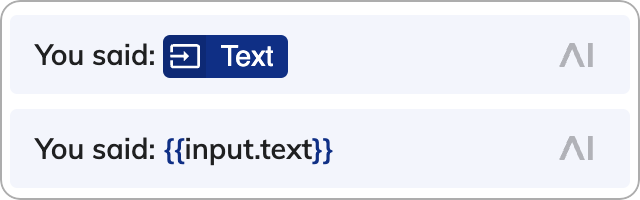
The default Token named **Text** represents `{{input.text}}`. The following image shows the **Text** Token in a Node and the corresponding CognigyScript expression after it:
.
### Create Tokens from JSON Editors
To create a Token from a JSON editor, right-click a CognigyScript expression and select **Create Token from JSON Path**. The selected CognigyScript expression is added to the **Script** field. If you highlight any code snippet and create a Token from the JSON path, the highlighted code is added to the **Name** field.
## Example
The default Token named **Text** represents `{{input.text}}`. The following image shows the **Text** Token in a Node and the corresponding CognigyScript expression after it: