> ## Documentation Index
> Fetch the complete documentation index at: https://docs.cognigy.com/llms.txt
> Use this file to discover all available pages before exploring further.
# Copilot: Sentiment Tile
Updated in 4.60
 ## Description
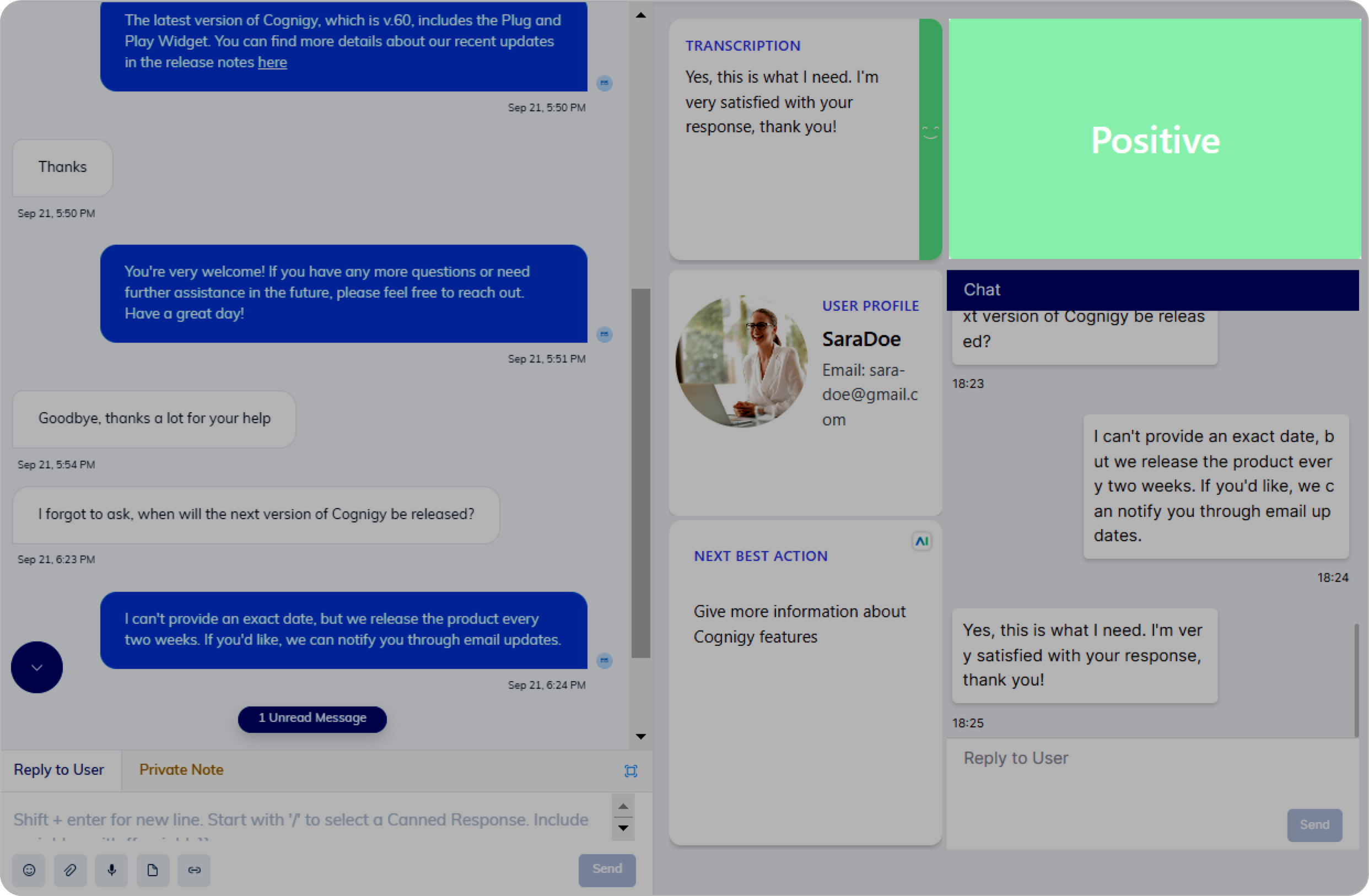
This Node performs sentiment analysis on the most recent input and provides insights into the emotional tone (positive, negative, or neutral) of the last user inputs. This real-time analysis offers immediate feedback to human agents regarding the emotional tone of the customer within the Agent Copilot workspace. For instance, if the sentiment becomes negative during a conversation, the system can promptly alert the human agent to take appropriate action.
## Prerequisites
* Add a [compatible LLM](/ai/agents/develop/gen-ai-and-llms/model-support-by-feature) and select the LLM in the [Generative AI settings](/ai/agents/develop/gen-ai-and-llms/generative-ai).
## Parameters
| Parameter | Type | Description |
| ------------------------ | ------------- | ---------------------------------------------------------------------------------------------------------------------------------------------- |
| Tile ID | CognigyScript | The ID that you created in the Agent Copilot configuration. |
| Sentiment Analysis Input | Select | The number of user inputs that should be analyzed by a model. You can choose whether you want to analyze the last input or the last 10 inputs. |
## Use Case
The Copilot: Sentiment Tile Node allows you to analyze a larger part of the conversation, extending beyond the user's latest message. This Node helps provide a more objective conversation assessment and empowers the management of the customer's overall impression.
## Description
This Node performs sentiment analysis on the most recent input and provides insights into the emotional tone (positive, negative, or neutral) of the last user inputs. This real-time analysis offers immediate feedback to human agents regarding the emotional tone of the customer within the Agent Copilot workspace. For instance, if the sentiment becomes negative during a conversation, the system can promptly alert the human agent to take appropriate action.
## Prerequisites
* Add a [compatible LLM](/ai/agents/develop/gen-ai-and-llms/model-support-by-feature) and select the LLM in the [Generative AI settings](/ai/agents/develop/gen-ai-and-llms/generative-ai).
## Parameters
| Parameter | Type | Description |
| ------------------------ | ------------- | ---------------------------------------------------------------------------------------------------------------------------------------------- |
| Tile ID | CognigyScript | The ID that you created in the Agent Copilot configuration. |
| Sentiment Analysis Input | Select | The number of user inputs that should be analyzed by a model. You can choose whether you want to analyze the last input or the last 10 inputs. |
## Use Case
The Copilot: Sentiment Tile Node allows you to analyze a larger part of the conversation, extending beyond the user's latest message. This Node helps provide a more objective conversation assessment and empowers the management of the customer's overall impression.
 ## More Information
* [Copilot: Transcript Tile](/ai/agents/develop/node-reference/agent-copilot/transcript-tile)
* [Copilot: Next Action Tile](/ai/agents/develop/node-reference/agent-copilot/next-action-tile)
* [Copilot: Identity Tile](/ai/agents/develop/node-reference/agent-copilot/identity-tile)
* [Agent Copilot Nodes](/ai/agents/develop/node-reference/agent-copilot/overview)
* [Agent Copilot](/agent-copilot/overview)
## More Information
* [Copilot: Transcript Tile](/ai/agents/develop/node-reference/agent-copilot/transcript-tile)
* [Copilot: Next Action Tile](/ai/agents/develop/node-reference/agent-copilot/next-action-tile)
* [Copilot: Identity Tile](/ai/agents/develop/node-reference/agent-copilot/identity-tile)
* [Agent Copilot Nodes](/ai/agents/develop/node-reference/agent-copilot/overview)
* [Agent Copilot](/agent-copilot/overview)