> ## Documentation Index
> Fetch the complete documentation index at: https://docs.cognigy.com/llms.txt
> Use this file to discover all available pages before exploring further.
# Check Agent Availability
Updated in 4.97
 ## Description
This Node checks the availability of agents with specific skills.
With this Node, you can manage your Flow,
for example, send notifications to the user that the agent is unavailable at the moment,
or suggest an alternative response.
The Check Agent Availability Node supports the following handover providers:
* Cognigy Live Agent
* Genesys Cloud: Guest Chat and Open Messaging
* Chatwoot
## Parameters
| Parameter | Type | Description |
| ----------------- | -------- | --------------------------------------------------------------------------------------------------------------------------------------------------------------------------------------------------------------------------------------------------------------------------------------------------------------------------------------------------------------------------------------------------------------------------------------------------------------------------- |
| Handover Provider | Selector | Select the handover provider from the list and [configure the handover accordingly](/ai/escalate/handover-reference/overview). The **Legacy** option is selected by default, meaning the Node configuration points to the settings in **Deploy > Endpoints > Handover** Settings. To select a provider from the list, you need to either migrate your settings to the [Handover Providers](/ai/escalate/migration) interface or create this handover provider from scratch. |
| Parameter | Type | Description |
| ------------------- | ------------- | ----------------------------------------------------------------------------- |
| Skills | CognigyScript | A list of skills that should be used to filter the available human agents. |
| Live Agent Inbox Id | CognigyScript | The ID of your Inbox in Live Agent. |
| Languages | CognigyScript | A list of languages that should be used to filter the available human agents. |
These settings are applicable to both [Genesys Cloud Guest Chat](/ai/escalate/handover-reference/genesys-cloud-guest-chat) and [Genesys Cloud Open Messaging](/ai/escalate/handover-reference/genesys-cloud-open-messaging).
| Parameter | Type | Description |
| --------------- | ---- | ----------------------------------------------------------------------------------- |
| Skills | List | A list of skills that should be used to filter the available human agents. |
| Profile Skills | List | A list of profile skills that should be used to filter the available human agents. |
| Language Skills | List | A list of language skills that should be used to filter the available human agents. |
| Parameter | Type | Description |
| ----------------- | ------------- | --------------------------------- |
| Chatwoot Inbox Id | CognigyScript | The ID of your Inbox in Chatwoot. |
| Parameter | Type | Description |
| ----------------------------- | ------------- | ----------------------------------------------------------------------------------------------------------------------------------------------------------------------------------------- |
| Where to store the result | Select | The storage for the search results. Select a storage:
## Description
This Node checks the availability of agents with specific skills.
With this Node, you can manage your Flow,
for example, send notifications to the user that the agent is unavailable at the moment,
or suggest an alternative response.
The Check Agent Availability Node supports the following handover providers:
* Cognigy Live Agent
* Genesys Cloud: Guest Chat and Open Messaging
* Chatwoot
## Parameters
| Parameter | Type | Description |
| ----------------- | -------- | --------------------------------------------------------------------------------------------------------------------------------------------------------------------------------------------------------------------------------------------------------------------------------------------------------------------------------------------------------------------------------------------------------------------------------------------------------------------------- |
| Handover Provider | Selector | Select the handover provider from the list and [configure the handover accordingly](/ai/escalate/handover-reference/overview). The **Legacy** option is selected by default, meaning the Node configuration points to the settings in **Deploy > Endpoints > Handover** Settings. To select a provider from the list, you need to either migrate your settings to the [Handover Providers](/ai/escalate/migration) interface or create this handover provider from scratch. |
| Parameter | Type | Description |
| ------------------- | ------------- | ----------------------------------------------------------------------------- |
| Skills | CognigyScript | A list of skills that should be used to filter the available human agents. |
| Live Agent Inbox Id | CognigyScript | The ID of your Inbox in Live Agent. |
| Languages | CognigyScript | A list of languages that should be used to filter the available human agents. |
These settings are applicable to both [Genesys Cloud Guest Chat](/ai/escalate/handover-reference/genesys-cloud-guest-chat) and [Genesys Cloud Open Messaging](/ai/escalate/handover-reference/genesys-cloud-open-messaging).
| Parameter | Type | Description |
| --------------- | ---- | ----------------------------------------------------------------------------------- |
| Skills | List | A list of skills that should be used to filter the available human agents. |
| Profile Skills | List | A list of profile skills that should be used to filter the available human agents. |
| Language Skills | List | A list of language skills that should be used to filter the available human agents. |
| Parameter | Type | Description |
| ----------------- | ------------- | --------------------------------- |
| Chatwoot Inbox Id | CognigyScript | The ID of your Inbox in Chatwoot. |
| Parameter | Type | Description |
| ----------------------------- | ------------- | ----------------------------------------------------------------------------------------------------------------------------------------------------------------------------------------- |
| Where to store the result | Select | The storage for the search results. Select a storage:- **Input** — the content is stored in the Input object.
- **Context** — the content is stored in the Context.
|
| Input Key to store result | CognigyScript | The location in the input object where the result is stored. For example, `input.knowledgeSearch`. |
| Input Context to store result | CognigyScript | The location in the context object where the result is stored. For example, `context.knowledgeSearch`. |
| Parameter | Type | Description |
| ----------------------------- | ------ | --------------------------------------------------------------------------------------------------------------------------------------------------------------------------------------------------------------------------------------------------------------------------------------------------------------------------------------------------------------------------------------------------------------------------------------------------------------------------------------------------------------------------------------------------------------------------------------------------------------------------------------------------------------------------------------------------------------------------------------------------------------------------------------------------------------------------------------------------------------------------------------------------------------------------- |
| Error Logging | Select | You can select one of the Error Logging options:- **Don't log errors** — this parameter doesn't allow errors to be logged. It's suitable for environments where error tracking isn't desired, such as production systems, to maintain clean logs.
- **Log error codes and responses** — this parameter records essential information, including error codes such as HTTP status codes, and the responses received from the server. It's useful for basic troubleshooting and understanding error contexts.
- **Log full errors and request payloads** — this parameter provides comprehensive error logging. It not only captures error codes and responses but also logs the complete error messages or details and the entire request payload sent to the server. Be cautious with this option, as it can expose sensitive data. It's most beneficial for in-depth debugging and diagnostics.
|
| Abort Flow Execution on Error | Toggle | Halts Flow Execution on HTTP status codes greater than 299. |
## Example
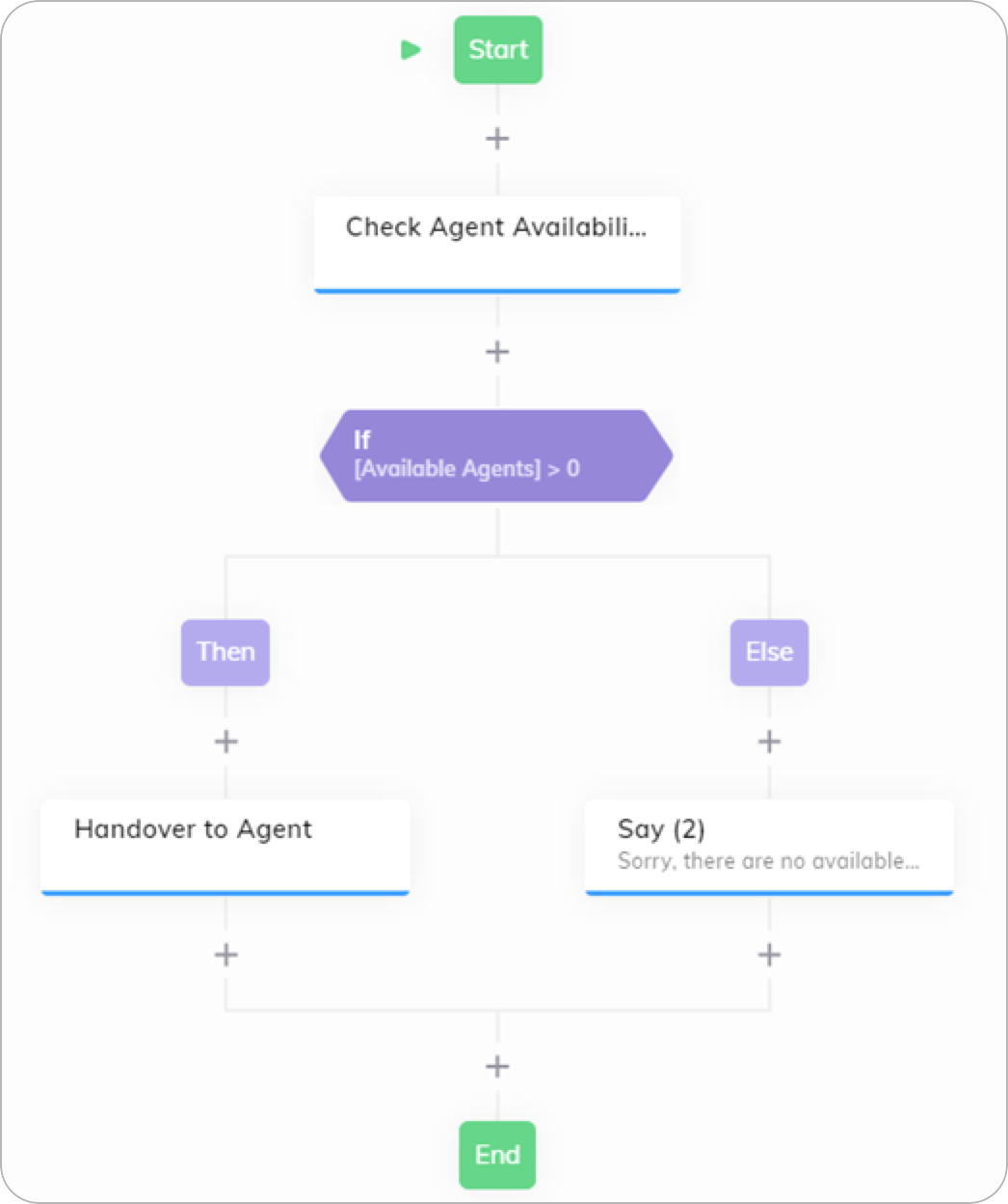
To build a Flow using the Check Agent Availability Node, follow these steps:
1. In the Flow editor, add a **Check Agent Availability Node** and enter the required values. For example, for the Live Agent handover provider, you need to specify **Live Agent Inbox Id**, **Skills**, and **Languages** that help you sort available agents.
2. Below the Check Agent Availability Node, add an IF Node and configure the **Condition** fields as follows:
1. Click  and select the **Available Agents** Token.
2. Select **>**.
3. Enter **0**.
3. Below your **Then** child Node, add a **Handover to Human Agent** Node. Enter the required values for your handover provider. For example, for the Live Agent handover provider, you need to specify **Live Agent Inbox Id**, **Skills**, and **Languages** that help you route the conversation to available agents.
4. Below the **Else** child Node, add a **Say** Node and specify the following text in the **Text** field: `All of our agents are currently assisting other customers. Please try again later`.
To test your Flow, use [Demo Webchat](/webchat/demo).
and select the **Available Agents** Token.
2. Select **>**.
3. Enter **0**.
3. Below your **Then** child Node, add a **Handover to Human Agent** Node. Enter the required values for your handover provider. For example, for the Live Agent handover provider, you need to specify **Live Agent Inbox Id**, **Skills**, and **Languages** that help you route the conversation to available agents.
4. Below the **Else** child Node, add a **Say** Node and specify the following text in the **Text** field: `All of our agents are currently assisting other customers. Please try again later`.
To test your Flow, use [Demo Webchat](/webchat/demo).
 ## More Information
* [Agent to Handover Node](/ai/escalate/handover-reference/live-agent)
* [IF Node](/ai/agents/develop/node-reference/logic/if)
* [Say Node](/ai/agents/develop/node-reference/basic/say)
## More Information
* [Agent to Handover Node](/ai/escalate/handover-reference/live-agent)
* [IF Node](/ai/agents/develop/node-reference/logic/if)
* [Say Node](/ai/agents/develop/node-reference/basic/say)