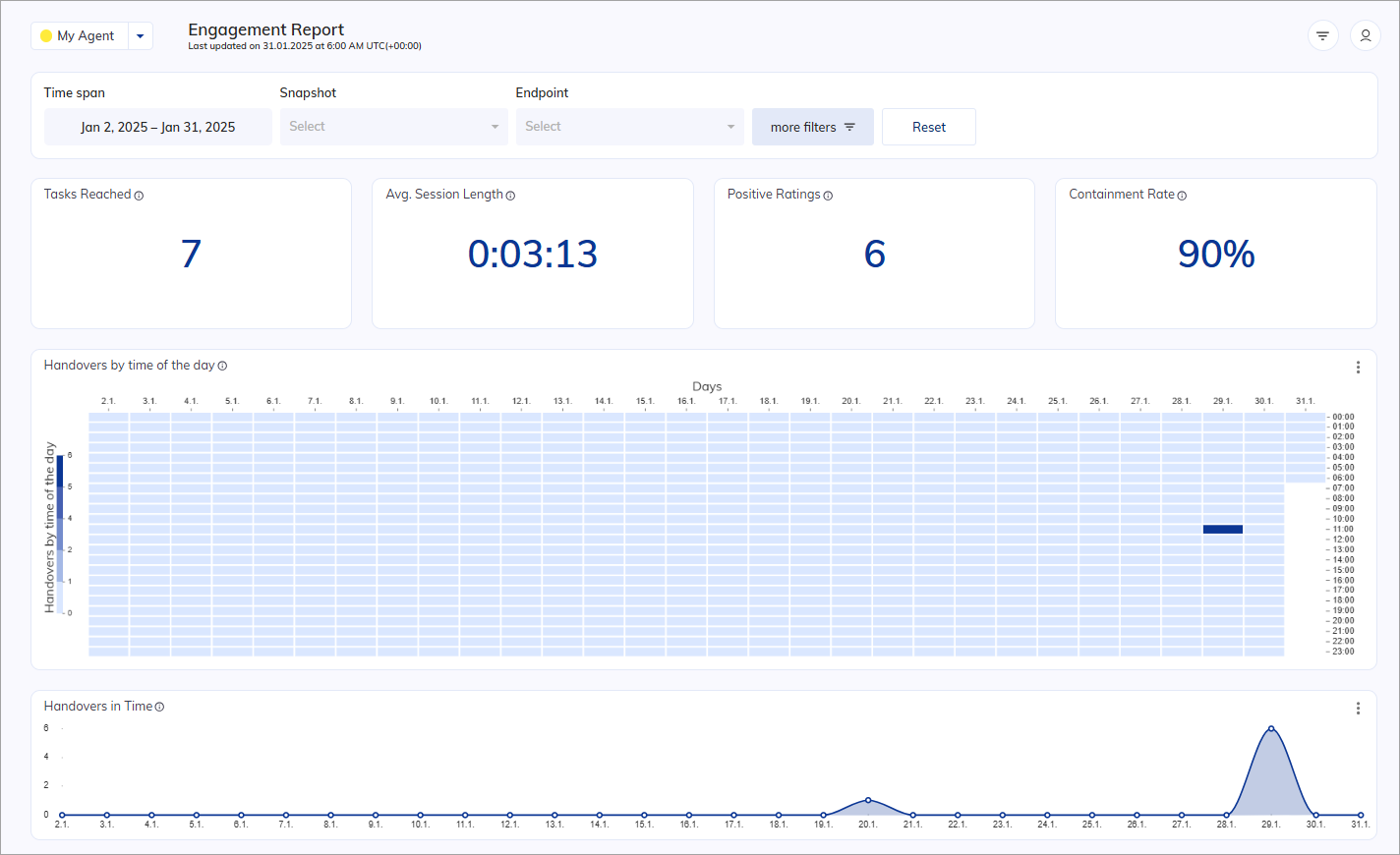
Updated in 2025.19 The Engagement Report highlights customer interactions in conversations and visualizes the engagement performance of your AI Agent in the following charts: Charts display data based on the global filter settings.
Engagement report showing session metrics, ratings, and handover data

Indicators

The Indicator charts display real-time data that refreshes every 30 seconds.

Tasks reached

This chart displays the total number of completed tasks. Source table:
 | StartedAt  |  Sessions   |  Tasks                   | Tasks reached |
 | ---------- | ----------- | ------------------------ | ------------- |
 | 2022/01/01 | session-123 | "Goal A, Goal B, Goal D" |       3       |
 | 2022/01/01 | session-456 | "Goal B, Goal C, Goal E" |       3       |
 | 2022/01/03 | session-789 | "Goal B, Goal E"         |       2       |
 | 2022/01/03 | session-abc | "Goal B"                 |       1       |
 | 2022/01/05 | session-def | "Goal A, Goal B"         |       2       |
Result: 11

Avg. Session length

Displays how long the average session lasted. The session length is defined as the time difference between the timestamp of the first user input and the last user input. The Average session length is the mean of all session lengths within the specified time span in your Insights filter. Source table:
 | StartedAt           |  EndedAt            | Sessions    |          
 | ------------------- | ------------------- | ----------- |
 | 2022/01/01 12:15 00 | 2022/01/01 12:18 00 | session-123 |
 | 2022/01/01 14:00 00 | 2022/01/01 15:00 00 | session-456 |
 | 2022/01/03 09:05 30 | 2022/01/03 09:15 30 | session-789 |
 | 2022/01/03 11:30 00 | 2022/01/03 11:44 00 | session-abc |
 | 2022/01/05 06:10 00 | 2022/01/05 06:20 00 | session-def |
Calculation:
  1. Length for a particular session Max(timestamp) - Min(timestamp).
  2. Length of all sessions / total number of sessions.
Example:
  1. Total Length = 3 minutes + 1 hour + 10 minutes + 14 minutes + 10 minutes = 1 hour 37 minutes
  2. Average Session Length = 1 hour 37 minutes / 5 = 19 minutes and 24 seconds
Result: 00:19:24

Positive Ratings

Displays the total number of Positive Ratings the end user has given. Source table:
| Sessions    | Positive Rating | Negative Rating | Rated Sessions |
| ----------- | --------------- | --------------- | -------------- |
| session-123 |        1        |        0        |       1        |
| session-456 |        0        |        1        |       1        |
| session-789 |        0        |        0        |       0        |
| session-abc |        1        |        0        |       1        |
| session-def |        1        |        0        |       1        |
| ---------------------------------------------------------------- |
| TOTAL       |        3        |        1        |       4        |
Result: 3

Containment Rate

Displays containment rate. The containment rate is calculated by the ratio of sessions without any handover to all sessions. Source table:
| Session ID  | Handovers | Handover Sessions | Sessions |
| ----------- | ----------| ----------------- | -------- |
| session-123 |     3     |        1          |    1     |
| session-456 |     0     |        0          |    1     |
| session-789 |     0     |        0          |    1     |
| session-abc |     2     |        1          |    1     |
| session-def |     1     |        1          |    1     |
| ------------------------------------------------------ |
| TOTAL       |     6     |        3          |    5     |
Formula:
  1. Containment Rate = 1 - (Handover included Sessions)/(Total Sessions).
  2. Percentage Containment Rate * 100%.
Result: 40%

Heat maps

Handovers by time of the day

Displays the number of times a human agent is contacted during the day. Multiple handovers can occur within a single session. Source table:
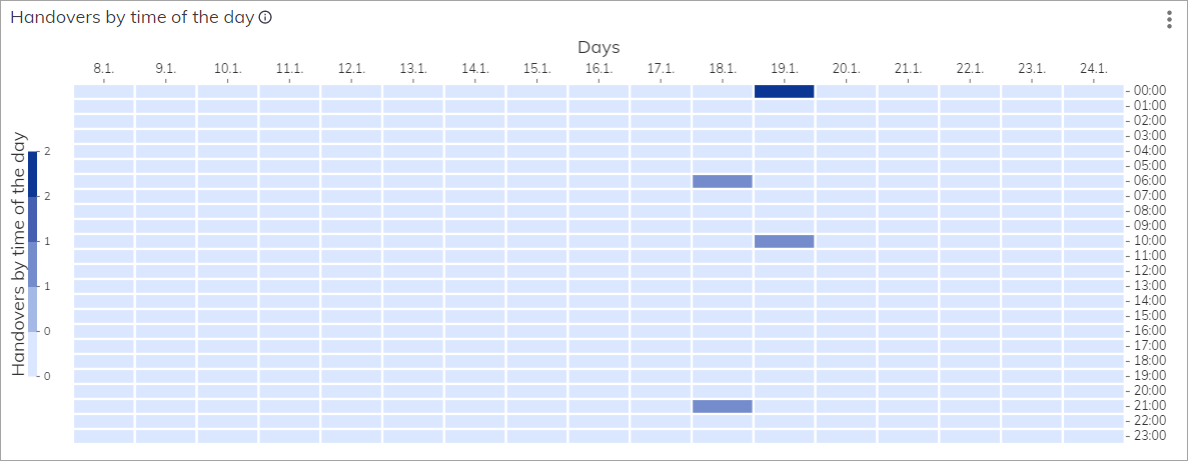
| DateTime        | Handover   |
| --------------- | ---------- |
| 01/8/2023 16:00 |	   0       |
| 01/8/2023 17:00 |	   0       |
| 01/9/2023 00:00 |    0       |
| 1/11/2023 15:00 |    0       |
| 1/15/2023 18:00 |    0       |
| 1/16/2023 21:00 |    0       |
| 1/17/2023 11:00 |    0       |
| 1/18/2023 06:00 |    1       |
| 1/18/2023 21:00 |    1       |
| 1/19/2023 00:00 |    2       |
| 1/19/2023 10:00 |    1       |
| 1/23/2023 13:00 |    0       |
| 1/24/2023 23:00 |    0       |
Result:
Heat map showing handover frequency by time of day and day of week

Bar charts

Containment Rate

Updated in 4.48 Indicates the percentage of sessions without any handover during the timeline. Source table:
| Date      | Containment Rate | Total Sessions | Handover included Sessions |
| --------- | ---------------  | -------------- | -------------------------- |
| 3/1/2023  | 	87.5           |       40       | 	       35                |
| 3/2/2023  | 	82.60869565    |       46       | 	       38                |
| 3/3/2023  | 	96.77419355    |       62       | 	       60                |
| 3/6/2023  | 	92.5           |       40       | 	       37                |
| 3/7/2023  | 	100            |       58       | 	       58                |
| 3/8/2023  | 	100            |       92       | 	       92                |
| 3/10/2023 | 	100            |       10       | 	       10                |
Formula:
  1. Containment Rate = 1 - (Handover included Sessions)/(Total Sessions).
  2. Percentage Containment Rate * 100%.
Example for the 3/1/2023: (35/40)* 100% = 87.5% Result:
Bar chart showing the containment rate percentage over time

Line charts

Handovers in Time

Displays the number of times a human agent was contacted within the filtered time span. Multiple handovers can occur within a single session. By clicking vertical-ellipsis, you can select Go to Step Explorer, which leads you to the Step Explorer in Insights. Source table:
| DateTime   | Handovers per day |
|------------|-------------------|
| 4/11/2023  |         3         |           
| 4/12/2023  |         0         |            
| 4/13/2023	 |        24         |           
| 4/14/2023	 |         8         |             
| 4/17/2023	 |        17         |        
| 4/18/2023	 |        12         |       
| 4/20/2023	 |         5         |         
| 4/21/2023	 |         5         |        
Result:
Line chart showing the number of handovers to human agents over time

Positive Ratings over Time

Displays the total number of Positive Ratings given as feedback by the end user. Source table:
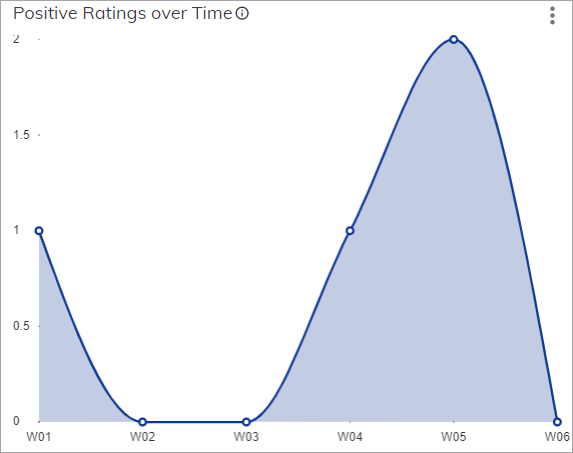
| Date (weeks) | Positive | Negative | Number of Ratings |
| ------------ | -------- | -------- | ----------------- |	
| 2023-W01	   |     1	  |    0     |         1         |
| 2023-W04	   |     1	  |    0     |         1         |
| 2023-W05	   |     2	  |    0     |         2         |
Result:
Line chart showing positive user ratings over time

Unique Contacts

Displays the number of unique contacts (userid) in relation to the selected timespan. If the user creates more than one session in a single day, it will be counted as one unique contact for that day. Source table:

| Date    	| Contacts |
| --------- | -------- |
| 1/16/2023	|    1     |
| 1/17/2023	|    8     |
| 1/18/2023	|    15    |
| 1/19/2023	|    6     |
| 1/20/2023	|    18    |
Result:
Line chart showing the number of unique contacts per day

Download Report

To download a report as a CSV file for the chart, click vertical-ellipsis in the upper-right corner of the chart. To create a report file, refer to the Download Report article.

More Information