

Choose an orchestration approach
Deterministic
Flows
Fixed, step-by-step processes. Use it when you need strict compliance, predictable outcomes, or high-volume transactional use cases.
Hybrid
Flows with AI where needed
Mostly structured journeys with some open-ended parts. For example, use AI to understand or answer within a controlled process.
Fully agentic
Agents
Open-ended conversations, multiple intents, and tasks where the agent needs to reason and pick tools. You can add deterministic steps as flow-based tools.
Agents and flows
Cognigy provides two complementary building blocks for AI-powered conversational experiences: agents and flows. Agents add AI-driven capabilities: they reason, use skills, and act through tools, such as calling APIs, searching knowledge, or sending an email. Flows add the structure and control to orchestrate conversational processes and business logic. You can use agents and flows independently, because an endpoint can point at either one. You can also combine them to balance AI-driven flexibility with structured execution. This page explains each concept and helps you decide which to use. It is for anyone who designs conversational experiences in Cognigy.Agents and flows at a glance
The following diagram shows how the concepts relate: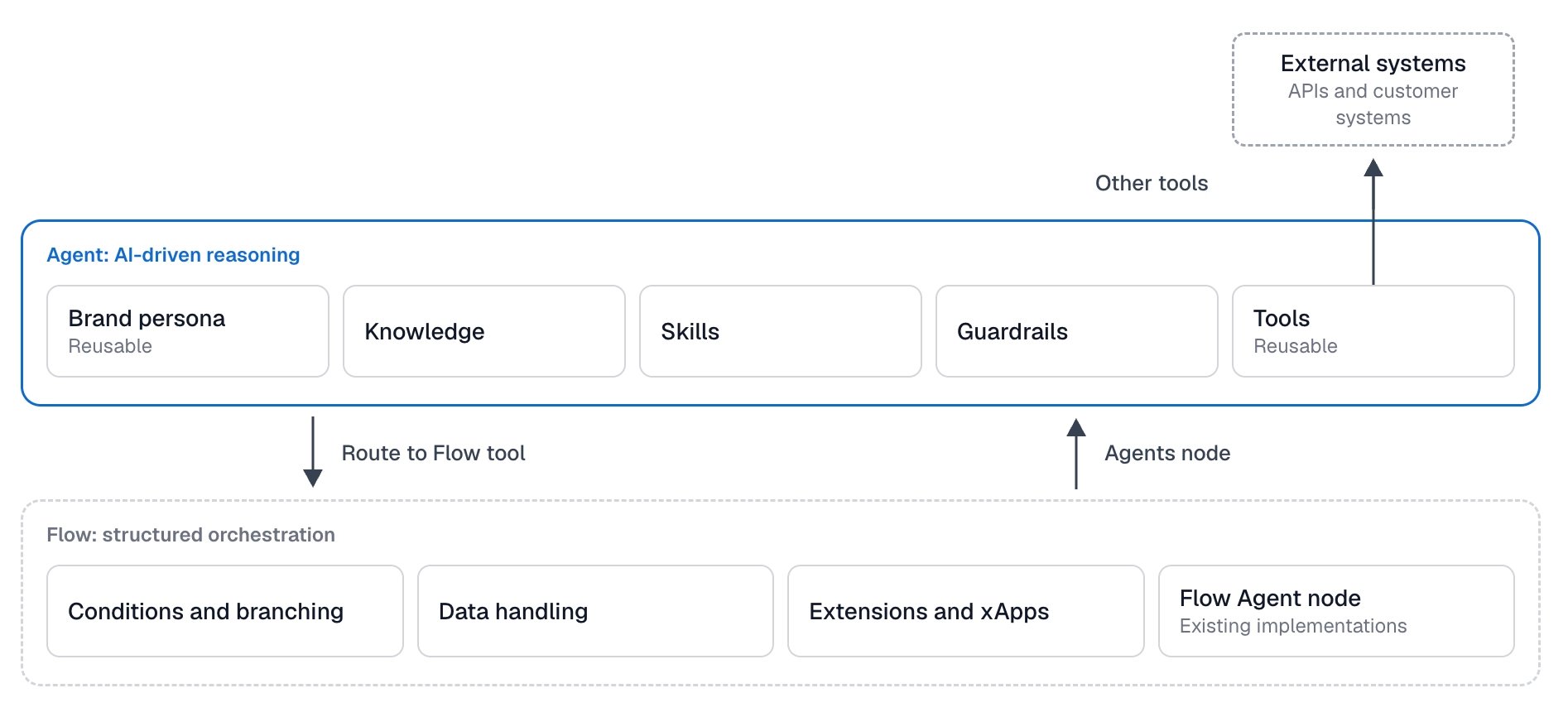
Agents (beta)
Agents are independent AI-powered entities that use reasoning, skills, and tools to accomplish tasks. You create, configure, and manage agents independently of individual flows. This separation makes agents reusable across different use cases and lets you develop their capabilities independently of workflow orchestration. With agents, you can:- Define the role and behavior of an agent.
- Equip an agent with skills.
- Connect tools that the agent can call, such as APIs, MCP servers, knowledge search, or email.
- Reuse the same agent across different conversational experiences: point an endpoint at it directly, or hand a conversation to it from a flow.
- Brand persona: The voice, tone, and speaking style that you define once and share across agents, separate from what each agent does. Set it on the agent’s Configuration tab.
- Knowledge: What an agent knows about your business. The agent searches your content at run time and answers from what it finds.
- Skills: Bundles of instructions and tools for a specific task, such as checking an order status.
- Tools: What an agent can do during a conversation, such as call an API, search knowledge, or send an email.
- Guardrails: The safety settings and data privacy settings that apply to every conversation of an agent.
Flows
Flows define and orchestrate the execution of conversational processes. A flow consists of nodes and gives you explicit control over operations, including conditions, branching, data handling, and integrations. Use flows when you need predefined execution steps, predictable behavior, or explicit control over business logic. For example, processes that involve payments or personal data can require structured execution, validation, and clearly defined steps. For more information, read the flows documentation.Flow agents
Flow agents provide agent functionality within a flow. You configure a flow agent’s identity, instructions, knowledge, and safety settings on the Flow agents tab of the Flows page. Its job, language model, tools, and memory are set on the Flow Agent node (formerly AI Agent node) in the flow. Flow agents combine agent capabilities with flow-based execution. Standalone agents offer a more flexible approach: you configure each agent independently, equip it with skills, and reuse the agent across different flows and use cases. Try agents alongside your existing flow agents to benefit from the capabilities and flexibility of the agents model. Flow agents remain supported, so you can keep running your existing implementations as they are. You can’t move flow agents to agents yet, so recreate the settings on an agent. For more information, read the flow agents and feature parity documentation.Combine agents and flows
Agents and flows complement each other:- Use agents for tasks that require AI-driven reasoning and dynamic use of skills and tools.
- Use flows to orchestrate processes that require explicit control, predictable execution, and structured business logic.
- From a flow to an agent. Add an Agents node at the end of the flow. It hands the conversation to an agent.
- From an agent to a flow. Give the agent the Route to Flow tool. It hands the conversation to a flow.
- From an agent to a flow and back. Give the agent the Execute Tool Flow tool. It runs a flow as a tool and returns the result to the agent, which keeps the conversation. For details, see Bi-directional transfer.
Some of these handover options depend on your environment and channel. The Agents node and the Route to Flow tool may not be available in your environment. To show the Route to Flow tool, turn on Enable Route to Flow tool in Agent Settings. To show the Agents node, turn on Enable Agents node in Agent Settings.
Build on the foundations
Agents and flows rely on the following parts of the Design phase:Language models
Connect a language model provider, check feature support, and configure a fallback.
Knowledge AI
Upload your content to a Knowledge Store so that agents can search it.
Voice
Let your agents talk to callers over the phone: set how they speak and listen, and connect them to a phone number.