

I want a shirt, you could annotate shirt as a placeholder tied to a product Slot,
helping the NLU recognize similar items, such as pants or hats.
Key Benefits
- Improved Detail Recognition. Annotations help the NLU pinpoint and extract specific information, for example, names, dates, or products, from user inputs, making conversations more precise and context-aware.
- Reduced Repetition. By integrating Slots into example sentences, annotations eliminate the need to write repetitive variations.
How to Use
To use Annotations, follow these steps:- In the Flow editor, go to NLU > Intents and select the desired Intent.
- Highlight a word in an example sentence within the text field and click +. A row with two lists will appear.
- Select Slot Type and key from the lists.
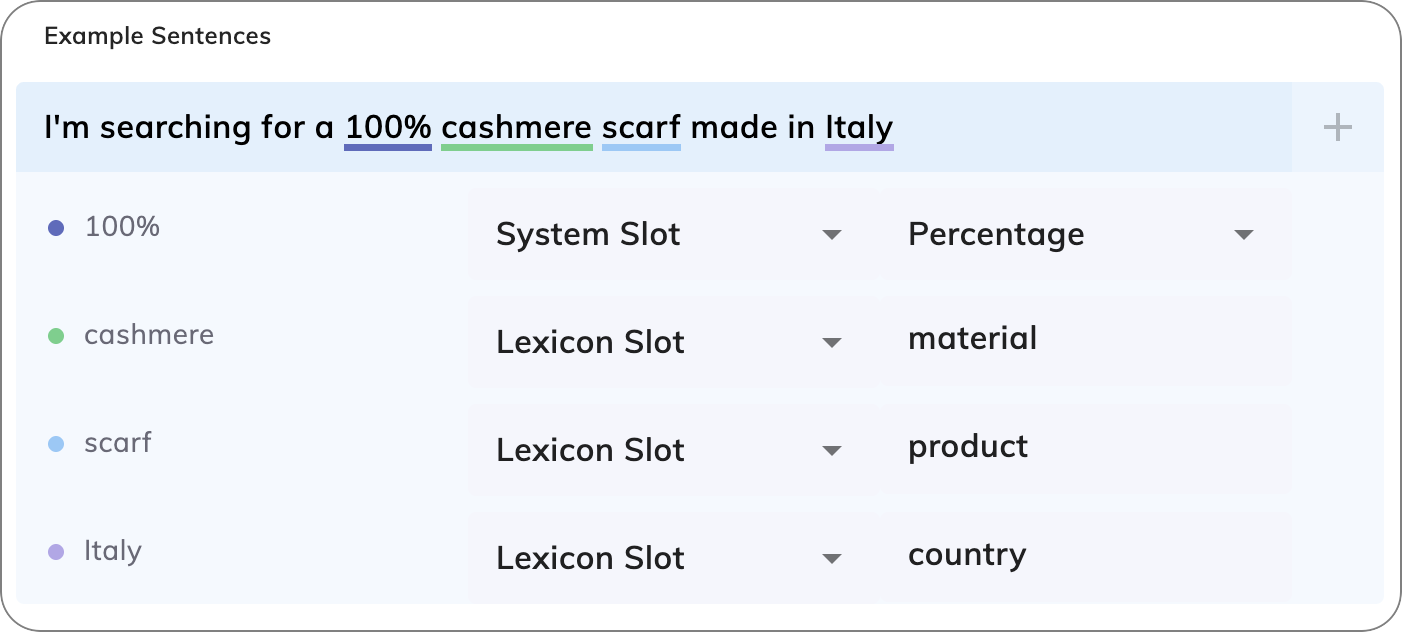
Exact Matching
If two sentences are nearly identical but differ only in Keyphrases that share the same Slot, the NLU model detects them as highly similar. In such cases, it automatically assigns a score of 0.95 to indicate a strong match.Example
Example Sentence:I want a burgerUser Input:
I want a pizzaResult: If
pizza and burger are both tagged with the same product Slot in the Lexicon, the match score will be 0.95.
Recommendations
-
Annotate whole words or phrases. When you annotate words or phrases by using a Lexicon Slot in an Example Sentence, annotate them as a whole to ensure correct matching. For example:
- In the sentence
I want a monthly subscription- If you assign only
monthto a Lexicon Slot, the NLU engine doesn’t recognizemonthly. - If you assign
monthlyto the Lexicon Slot, the NLU engine recognizes the Intent correctly.
- If you assign only
- In the sentence
Ich möchte ein monatliches Abonnement abschließen- If you assign only
monatlichto a Lexicon Slot, the NLU engine doesn’t recognizemonatliches. - If you assign
monatlichesto the Lexicon Slot, the NLU engine recognizes the Intent correctly.
- If you assign only
- In the sentence
-
Avoid selecting bordering spaces. When highlighting a word for annotation, make sure you select only the word itself without leading or trailing spaces. For example, select
monthlyinstead ofmonthlyormonthly. Including extra spaces in the selection can cause the NLU processing to fail. - Annotate only 50% of your example sentences with Slots for optimal Intent matching. This balanced approach instructs the NLU model that the Slot is relevant to the Intent, while also indicating that identifying the Slot isn’t mandatory for a successful Intent match.
-
Use common words instead of rare ones. Replace hard-to-understand terms with simpler ones to help the NLU model understand the context better. For example, instead of
PremiumPayID, you can usecredit card. Alternatively, you can includecredit cardin the example sentence and annotate it with a Lexicon Slot that maps toPremiumPayID.