

Intermediate · 15 minutes · Voice
Prerequisites
Complete the following prerequisites:- A voice agent named Nelly with text-to-speech and speech-to-text providers. To create a voice agent, follow Getting started with voice agents and name the agent
Nelly. - Speech to speech turned off for the agent. With speech to speech on, the Voice studio card isn’t available.
- A Voice endpoint that targets the agent.
- A browser with microphone access allowed. The test call uses your microphone.
Steps
1
Find where the voice endpoint gets its speech settings
- In the navigation menu of the project, go to Deploy > Endpoints and open the Voice endpoint that targets Nelly.
- On the Setup tab, find the Speech card. The Set on the agent badge means that the agent defines the speech settings.
- Click Edit speech on Nelly. The agent opens.
2
Open the voice studio
- On the Configuration tab of the agent, find the Voice section on the right side of the page.
- Click Voice studio. The voice studio opens in a full-page view.
3
Change the greeting
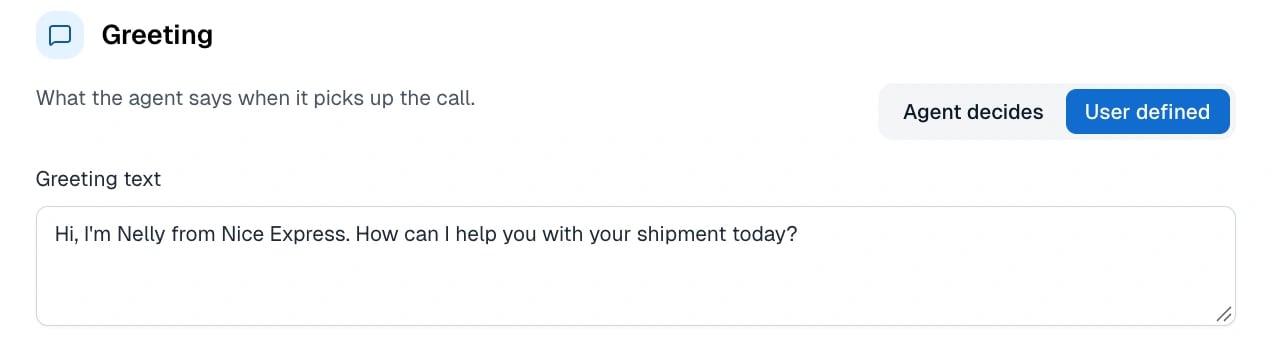
- Scroll to the Greeting section. This section describes what the agent says when it answers the call.
- Select User defined. With Agent decides, the agent creates its own greeting.
-
In the Greeting text field, enter the following text:
- To hear the greeting, click the play button next to the field.
4
Set up barge-in
- Scroll to the Turn taking section.
- From the Interruptions list, select Deliberate.

5
Save your changes
- In the upper-right corner of the voice studio, click Save. The voice studio closes.
- On the Configuration tab, click Save changes.
6
Test the changes with a voice call
- In the upper-right corner, click the chat icon to open the interaction panel.
- At the top of the panel, select Voice.
- Click Start a call. If your browser asks for microphone access, allow it.
- Listen to the greeting. Nelly says the text that you entered.
- While Nelly speaks, say “uh-huh”. The short sound doesn’t interrupt Nelly.
- While Nelly speaks, say a full sentence. Nelly stops and answers.
- End the call in the interaction panel.