Restrictions
- The Node Search field applies only to specific content and doesn’t match expressions in the following fields:
Non-searchable fields
Non-searchable fields
How to Use
To open the Node Search field, click in the lower-left corner of the Flow editor.
Search Matches in the Flow Editor
When you enter a text into the Node Search field, the Flow editor highlights matching Nodes in yellow and scrolls to the first match. Use and
and  to navigate between matches. Click
  to reset the search.
Toggle Search Results
Toggle Search Results
To close the Node Search field but keep the matching Nodes highlighted, click
again.
again.Search Matches in the Node Editor
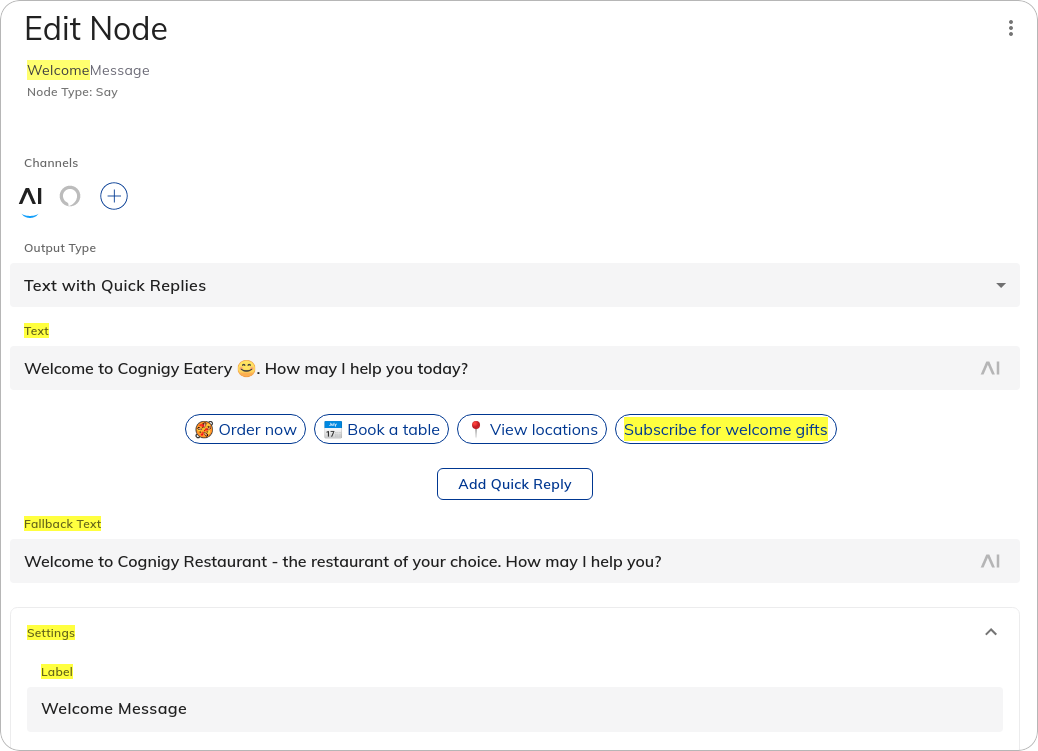
The Node search also matches text in the Node editor. When you open a matching Node, the field, section, or tab that matches the search text is highlighted.